
dock-files
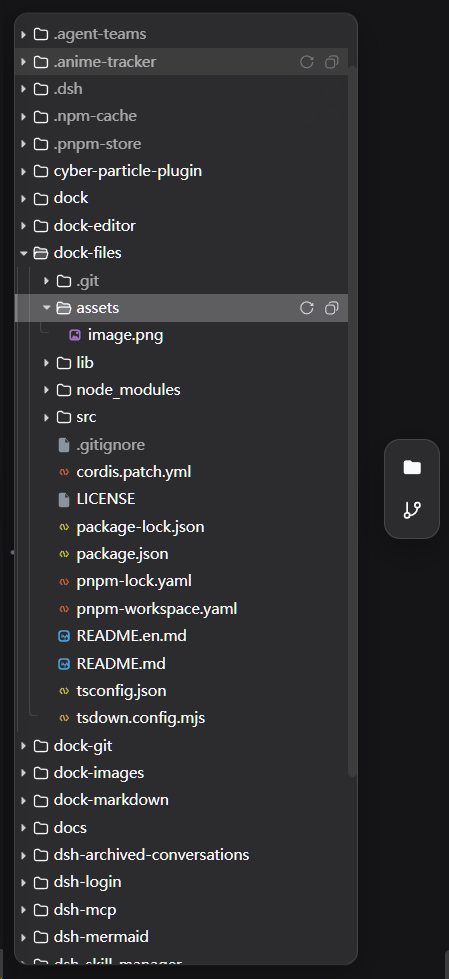
面向 DSH 工作区的文件浏览插件。 dock-files 提供 VSCode 风格的文件树、拖放导入、剪贴板粘贴、传输任务管理和右键菜单。
dock 系列的文件浏览插件:在侧边栏挂载文件面板,浏览当前会话工作目录(通过自己的 /wb-files 主机路由),点击文件交给已注册的文件查看器打开(如 dock-editor)。
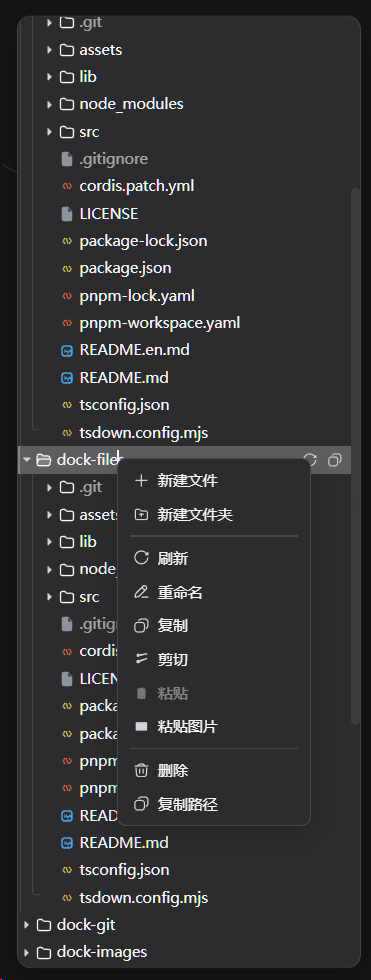
效果预览
| 主界面 | 右键菜单 |
|---|---|
 |  |
功能
- 目录树浏览:惰性递归展开,目录优先、大小写不敏感排序(VSCode 资源管理器顺序);VSCode 风格文件树 UI(类型彩色图标、树形导引线、工具栏刷新/折叠全部、悬停操作按钮)。
- 会话隔离:所有操作以会话工作目录为边界,路径经 realpath 规范化后必须位于会话工作区内,越界路径一律 403。
- 文件打开:点击文件通过
ctx.files.open分发给匹配的文件查看器(浮窗打开)。 - 对话路径打开:会话上下文中的文件路径——模型回复里的文件提及、工具卡片(read/edit/bash 摘要)中的路径、产出文件——点击后按扩展名交给对应的文件查看器(dock-editor / dock-images / dock-markdown)打开,不再依赖系统默认应用(
xdg-open/open/Invoke-Item);宿主没有桌面关联(容器 / headless / 失效的 IDE IPC socket)时不再弹出path open failed错误。文件夹、不存在的路径以及没有查看器注册的类型仍走系统默认应用。 - 文件管理器操作:右键菜单提供常用文件管理功能——新建文件 / 新建文件夹(自动去重命名,创建后直接进入行内重命名)、重命名(行内编辑,Enter 确认 / Esc 取消)、复制 / 剪切 / 粘贴(复制可重复粘贴,剪切项变灰、粘贴后清除)、粘贴图片(把系统剪贴板中的图片保存为文件,如
image.png,按 mime 类型自动命名去重;菜单项会探测剪贴板,仅在其中有图片时自动显示)、删除(确认后递归删除,不会覆盖同名文件)、复制路径、刷新;普通文件可通过右键菜单触发浏览器下载,软链接跳过下载;空白区域右键可对根目录执行新建 / 粘贴 / 粘贴图片 / 刷新。 - 拖放:把系统里的文件拖进浏览器即可导入到目标文件夹(按原名自动去重,绝不覆盖);树内拖动文件 / 文件夹到其它文件夹(或空白区域 = 根目录)可移动,拖到文件上则移入该文件所在目录(落点不准也能成功),拖到自身或子孙目录会被拒绝。
- 粘贴本地文件:在系统里复制文件后,点击面板使其获得焦点,按 Ctrl+V 即可粘贴导入(浏览器只通过 paste 事件暴露本地文件内容);粘贴目标为最近点击 / 右键过的文件夹,否则为根目录。
- 传输任务中心:普通文件使用分块上传,以支持大文件传输。所有传输任务统一进入全局内存任务中心,可在浮窗和状态栏查看,也可在底部查看总进度;任务支持暂停、继续和取消。任务状态不跨重启保留,重启后任务会消失;清除历史只移除任务记录,不删除文件。
- 上下文菜单:文件、文件夹与空白区域各自适配的菜单项,超出视口自动回拉;确认 / 提示使用与主题一致的应用内弹窗。暂不支持在 Windows 原生资源管理器中直接粘贴文件、复制文件内容、复制下载链接或下载文件夹。
- 多语言:界面文案(右键菜单、弹窗、提示、状态)跟随 DSH 语言设置(zh/en,随
locale/change事件即时切换);新建文件 / 文件夹的默认名也随语言(New File.txt/新建文件.txt)。 - 文件域服务:提供
ctx.files(open/registerFileViewer/registerFileIcon),其他插件可注册自己的查看器(exts扩展名匹配或default兜底)及按扩展名的图标(registerFileIcon,一个插件可注册多组);注册时可附带icon(主题色 + 可选自定义 SVG 图形),文件浏览器按扩展名渲染各插件注册的图标,未注册类型回退内置调色板。
依赖
| 依赖 | 类型 | 说明 |
|---|---|---|
| dock >= 0.1.0 | peer(必需) | 工作台外壳:dock-files 的侧边栏面板、浮窗、ctx.workbench 都由它提供 |
| DSH Web 环境 | 运行时 | 必需,客户端平台为 Web |
cordis ^4.0.0-rc.7 | peer | 插件框架(DSH 自带) |
react ^18.2.0 | peer(可选) | 客户端渲染需要;未提供时面板 UI 不激活 |
可选查看器(不装也能浏览,装了才能打开对应文件):dock-editor(文本)、dock-images(图片)、dock-markdown(Markdown)。
安装
需要 dock 基础插件:
推荐从 npm registry 安装:
dsh plugin --profile web add dock-base
dsh plugin --profile web add dock-files
或通过 GitHub 安装(备选):
dsh plugin --profile web add github:AKS1st/dock
dsh plugin --profile web add github:AKS1st/dock-files配合查看器插件使用(可组合、按需):dock-editor(文本)、dock-images(图片)、dock-markdown(Markdown)。
安全
主机路由只接受来自受信任来源(回环地址 / 配置的 trustedHosts + 同源检查)的 POST 请求,且任何目录访问都会先做 realpath 规范化再与会话工作区做前缀比较——.. 逃逸、指向工作区外的符号链接、无关绝对路径都会被拒绝(403)。
License
MIT
