
dsh-doctor

Your dsh config has settings that silently stopped applying. This tells you which ones.
English | 中文
npx github:asdf17128/dsh-doctorOne command, ten seconds, read-only. No config, no signup, no dependencies.
Why your setting isn't taking effect
Two dsh behaviours boot cleanly with exit code 0, so nothing tells you:
A patch replaces an entry's whole config. You change one field; every sibling field you did not restate disappears from the tree that boots. The plugin then runs on defaults you never chose.
  config:
    fallbackMaxWords: 12
-   fallbackMaxBytes: 40      ← gone, silently
-   maxTitleBytes: 80         ← gone, silently
A typo in an entry id is inert. Write agent-defualt-model and dsh prints one stderr line, then boots without your change. Launching the Web UI, you never see it — you just wonder why nothing happened.
Both get worse after an upgrade renames an entry id, and neither surfaces until behaviour drifts weeks later.
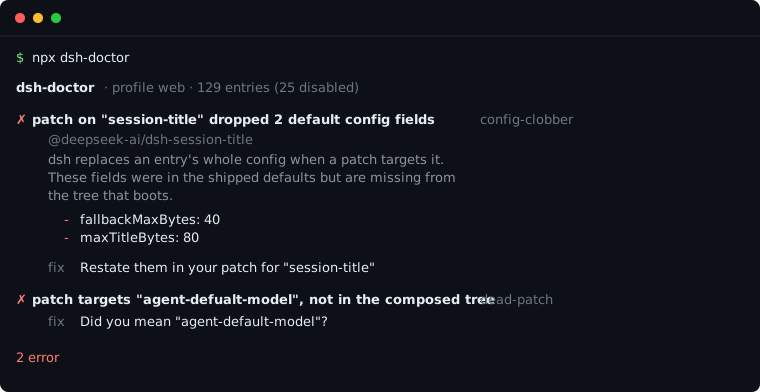
What it looks like
dsh-doctor · profile web · 130 entries (25 disabled)

✗ patch on "session-title" dropped 2 default config fields  config-clobber
    @deepseek-ai/dsh-session-title
    dsh replaces an entry's whole config when a patch targets it. These fields
    were in the shipped defaults but are missing from the tree that boots, so
    the plugin now runs without them.
      - fallbackMaxBytes: 40
      - maxTitleBytes: 80

    fix Restate them in your patch for "session-title":
            fallbackMaxBytes: 40
            maxTitleBytes: 80

✗ patch targets "agent-defualt-model", which is not in the composed tree  dead-patch
    ~/.dsh/profiles/web/cordis.patch.yml patches an entry id that does not
    exist, so dsh prints one stderr warning and boots without it. Everything
    in that patch is inert.

    fix Did you mean "agent-default-model"? Rename the id, or delete the
        patch block if the plugin is gone.

2 error
As a dsh plugin
Installed into a profile, dsh-doctor registers a config_doctor tool so the agent can inspect the configuration it is itself running under:
dsh plugin --profile web add dsh-doctorThen ask it — "why isn't my session-title setting taking effect?" — and it answers from the composed tree instead of guessing. Read-only; --fix stays CLI-only, because rewriting your patch file is not something an agent should do from a chat turn.
Checks
| Rule | Severity | What it catches |
|---|---|---|
config-clobber | error | Default config fields your patch dropped by not restating them |
dead-patch | error | A patch targeting an entry id that is not in the tree (with a did-you-mean) |
tool-collision | error | Two mounted plugins registering the same tool name — dsh refuses to start |
plugin-not-mounted | warn | A plugin installed into the profile that nothing ever loads |
plugin-stale | warn | A third-party plugin with no npm release in 180+ days |
entry-removed | warn | A shipped entry your patch layer removed |
entry-toggled / entry-added | info | Every other difference from the shipped profile, so the diff is visible |
Explain mode
A healthy install gets "no problems found", which tells you nothing about what you are running. --explain answers that instead:
Your harness: 130 entries, 103 active, 25 disabled, 2 conditional

  Web UI                  32
  Tools                   18  (16 off)
  Sessions & history      11
  Agent loop               5  (1 off)
  ...

Conditional (2) — enablement is decided at mount time, not here
  bash-sandbox             !!js process.platform === 'win32'
  pwsh-sandbox             !!js process.platform !== 'win32'
Entries whose disabled: is a !!js expression are reported as *conditional* rather than collapsed to a boolean — the answer depends on the machine that boots, and the tool never evaluates your config to find out.
Usage
npx dsh-doctor                      # check the web profile
npx dsh-doctor --explain            # describe the tree instead of checking it
npx dsh-doctor --profile headless   # another profile
npx dsh-doctor --verbose            # include informational notes
npx dsh-doctor --json               # machine-readable
npx dsh-doctor --fix                # restate the dropped fields for you
npx dsh-doctor --offline            # skip npm registry lookups
npx dsh-doctor --quiet              # print only when something is wrong
Exit codes: 0 clean or warnings only · 1 at least one error · 2 could not inspect.
Useful in CI, or as a pre-upgrade check:
npx dsh-doctor --quiet || echo "review your patches before upgrading dsh"--fix
--fix restates the fields a patch dropped, writing them back into the same config: block with the values the shipped profile declared:
  - id: session-title
    config:
      fallbackMaxWords: 12
+     fallbackMaxBytes: 40
+     maxTitleBytes: 80
It edits inside that block only — comments, ordering and every other entry stay byte-identical — and writes a .bak beside the file first. A nested key path is reported for you to restate by hand rather than guessed at, and dead-patch findings are never auto-fixed because renaming versus deleting is your call.
How it works
It shells out to dsh's own composition:
dsh --profile <p> --dump-config— the tree that actually boots (bundles → profile patch → home patch → overlays)dsh --profile <p> --dump-default-config— the same tree without your user layer
Every finding is a diff between those two, so the report can attribute a change to *your* patches rather than to an upstream default. It also reads the profile's package.json and cordis.patch.yml files.
It never boots a plugin and never evaluates the !!js expressions in your config.
Two caveats about writes, since "read-only" is easy to overstate:
--fixwrites, by design — into the flaggedconfig:block only,.bakfirst.- Composing a profile is dsh's own operation, and dsh materialises a template
the first time a profile is used. So running this against a $DSH_HOME that has no profiles yet will leave profiles/<name>/ behind — created by dsh, not by us, but worth knowing before you point it at a pristine home.
Install and uninstall
As a CLI, nothing to install — npx dsh-doctor runs it.
As a plugin:
dsh plugin --profile web add github:asdf17128/dsh-doctor   # install
dsh plugin --profile web remove dsh-doctor                 # uninstall
Removing it drops the config_doctor tool and leaves nothing behind: the plugin never writes to your Harness home.
Compatibility
Verified against @deepseek-ai/dsh 0.1.0-rc.5. dsh is in developer preview and ships breaking changes; the checks read --dump-config output, so a change to that format is what would break them first. Open an issue if a newer dsh reports something odd and I will pin down the difference.
Requirements
Node 18+ and a working dsh (local node_modules/.bin/dsh is preferred, otherwise one on PATH).
Why this exists
dsh is in developer preview and ships breaking changes; its "everything is a plugin" model means your tree is a stack of patch layers, and the layering rules are unforgiving in exactly one direction — the failure modes above are silent. This tool is the thing that tells you.
Behaviour verified against @deepseek-ai/dsh 0.1.0-rc.5.
Contributing
Issues and PRs welcome — especially new check rules with a reproduction. Run the tests with npm test.
License
MIT
