
dsh-advisor



A standalone dsh (DeepSeek Harness) plugin bundle porting the omp "advisor" subsystem: a per-session independent reviewer model that observes the primary transcript, reviews each stepped turn with an explicitly configured model (provider + model are required), and injects severity-ranked advice (nit / concern / blocker) back into the session — without polluting or recursively reviewing itself.
Advisory only. The advisor never approves or rejects the primary agent's actions, and never issues commands as if it were the primary agent. Every delivered message is self-described advisory content, and a misbehaving reviewer is bounded end to end (emission guard, immuneTurns cooldown, failure policy) so it can never stall or pollute the primary loop.
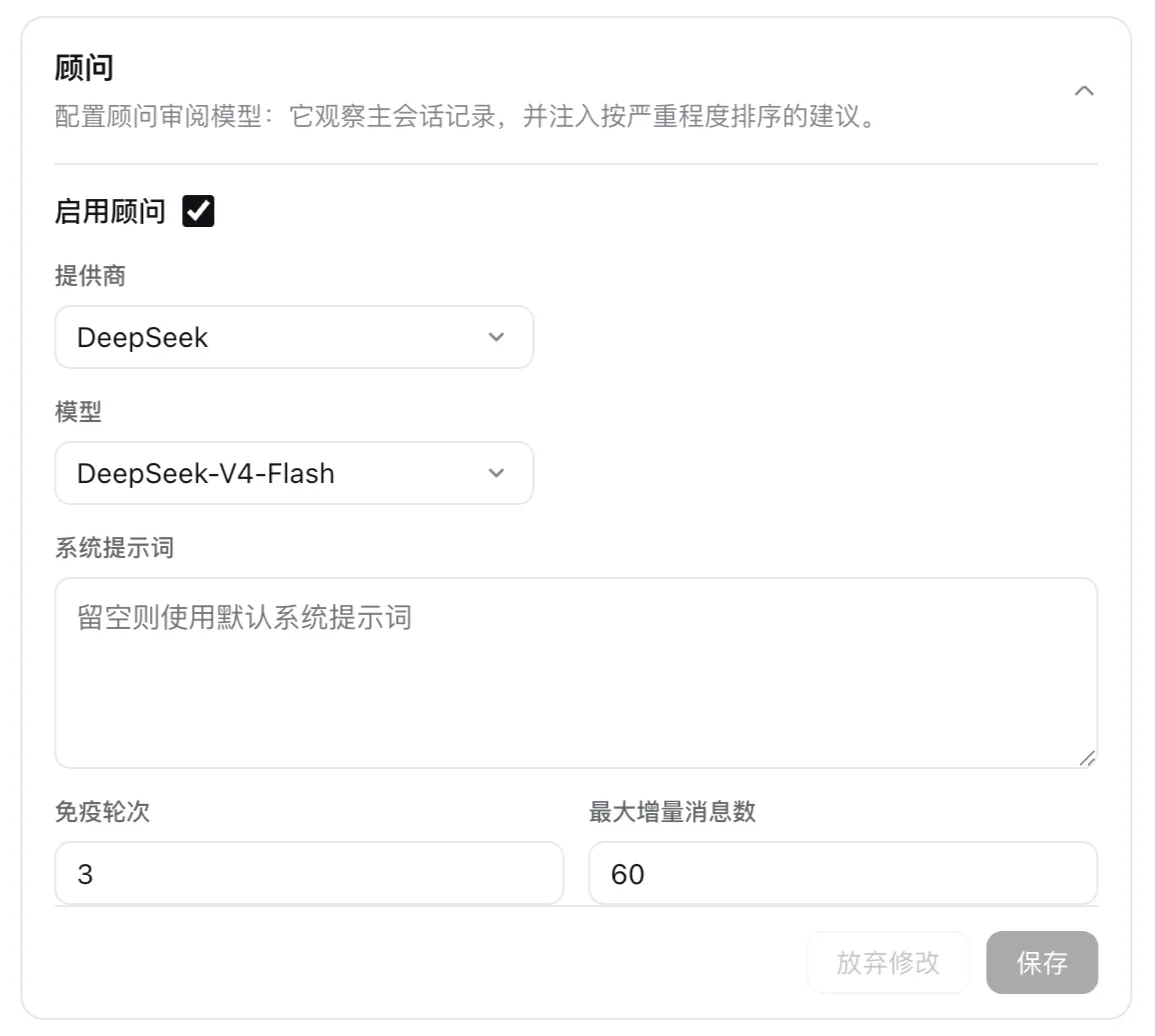
Works in both dsh front ends: the web profile (Settings → 插件配置 → Advisor card) and the dsh-tui terminal profile (/advisor + /advisor config).
Quick start
Install
dsh plugin --profile web add dsh-advisor      # web profile (Settings → Advisor card)
dsh plugin --profile dsh-tui add dsh-advisor  # dsh-tui terminal profile
Same plugin, either front end — the only difference is the --profile flag. Pin a version with @<version> (e.g. [email protected]). A registry install fetches the published tarball, which ships the built artifacts (lib/ + cordis.patch.yml) — nothing builds on the target machine, and runtime dependencies (@deepseek-ai/cordis, @deepseek-ai/schemastery, @deepseek-ai/dsh-* peers) resolve through the dsh installation's flat profile module fallback — no extra install step. Registry / git / tarball / local-directory variants (local-dir from a built checkout: dsh plugin --profile web add . or dsh plugin --profile dsh-tui add .), web Settings exposure, uninstall, and --dump-config verification → docs/install.md.
Configuration
Add an advisor: section to the global dsh settings document (default $DSH_HOME/settings.yaml — shared across profiles; the web Settings card writes to this same file):
advisor:
  enabled: true                # master switch (default false) — set explicitly to enable
  provider: deepseek-official  # REQUIRED when enabled
  model: deepseek-flash        # REQUIRED when enabled; fallback: deepseek-v4-flash (or another V4 id) until the gateway enables the V41 route
  systemPrompt: ""             # optional; "" = built-in reviewer prompt
  immuneTurns: 3               # int ≥ 0, default 3 — cooldown after a delivered steer
  maxDeltaMessages: 60         # int ≥ 0, default 60 — delta window; 0 = unbounded
The advisor is off by default. When enabled, provider and model are mandatory: enabled: true without both is a hard gate — the advisor never starts a model call and reports a disabled-with-reason status; unknown config keys are rejected.
The same keys compose across three surfaces (later layers override earlier ones; every surface shares the same key set and the same hard gate, with the host-side gate as the final line of defense on every path):
- Plugin-row config — the profile patch layer (
$DSH_HOME/profiles/<profile>/cordis.patch.yml). This is the composition base. - dsh web Settings page — the "插件配置" (Plugin Configuration) page — the Advisor card (namespace key
advisor) with the enabled toggle, provider / model selects restricted to system-configured providers and their models, and the optional fields. Saving writes into theadvisorsettings namespace and applies to new sessions immediately — no restart. The card requires a current dsh web build whose shell declares thesettings.plugin.itemcard slot and loads packages that declaredsh.client; it reads and writes the namespace through the officialGatewayServiceRPC channel (/api/advisor/get+/api/advisor/set), which is not gated by the settings exposure allowlist. It additionally blocks saving while enabled with a required field empty. /advisorcommand — per-session and ephemeral: it flips a session override, never the persisted config (see Verify).
In a dsh-tui profile the same five keys are editable in the TUI /settings screen: run dsh --profile dsh-tui, open /settings, and edit the Advisor section (enabled / provider / model / immuneTurns / maxDeltaMessages, each with zh/en label + hint). Edits are staged and written on save through the revision-fenced settings.mutate into the same advisor namespace user layer the web card writes, and re-apply live without a restart. systemPrompt is NOT a TUI field (the TUI text control is single-line; a multi-line prompt would be truncated) — edit it via the web card or $DSH_HOME/settings.yaml. The section requires dsh-tui ≥ v0.8.0 (shipped in the dsh-tui-settings-sections row of the v0.8.0+ bundle); older dsh-tui versions no-op it cleanly and the two file paths — profile patch layer + global $DSH_HOME/settings.yaml — remain the edit paths. /advisor config stays a read-only readback whose edit hint names the /settings screen when the seam is mounted. Save behavior differs from the web card: the TUI seam has no cross-field validation, so a save may set enabled: true with empty provider/model — the explicit model gate resolves that to disabled-with-reason at runtime (visible via /advisor status and /advisor config); the web card blocks such a save outright. Full reference → docs/configuration.md.
Verify
dsh --profile web --dump-config # shows a "# == dsh-advisor" layer with the advisor rowWith the advisor installed and enabled, control it in-session with the /advisor command (available when a command registry is composed):
/advisor            toggle the advisor for this session
/advisor on         enable the advisor for this session
/advisor off        disable the advisor for this session
/advisor status     show state, model, runtime status, pending count, last activity
/advisor on|off|toggle are session-scoped and ephemeral: they flip a per-session override, never the persisted config. Enabling a session whose config lacks provider/model starts no model call — /advisor status (and the /advisor on reply) shows the gate reason: the advisor runs only when enabled with both configured. /advisor on is also the manual recovery path: a session advisor paused by a quota/rate-limit (quota_exhausted — no auto-resume timer) resumes in place, and a halted advisor (permanent model error, e.g. invalid credentials) is rebuilt fresh for the session.
In a dsh-tui profile, /advisor config additionally reads back the composed configuration — read-only, with edit hints naming the real write paths: the TUI /settings screen (Advisor section, dsh-tui ≥ v0.8.0), the profile patch layer, and the shared $DSH_HOME/settings.yaml advisor: section. The /advisor / on|off|status|config commands are listed in the TUI / menu with subcommand completion (command discovery requires the dsh-tui-command-trees row — the shipped dsh-tui bundle has it).
Features
- Independent reviewer per session: a separate model call observes the primary transcript and reviews each stepped primary turn; advisor messages are excluded from later deltas, so the advisor never reads its own advice back.
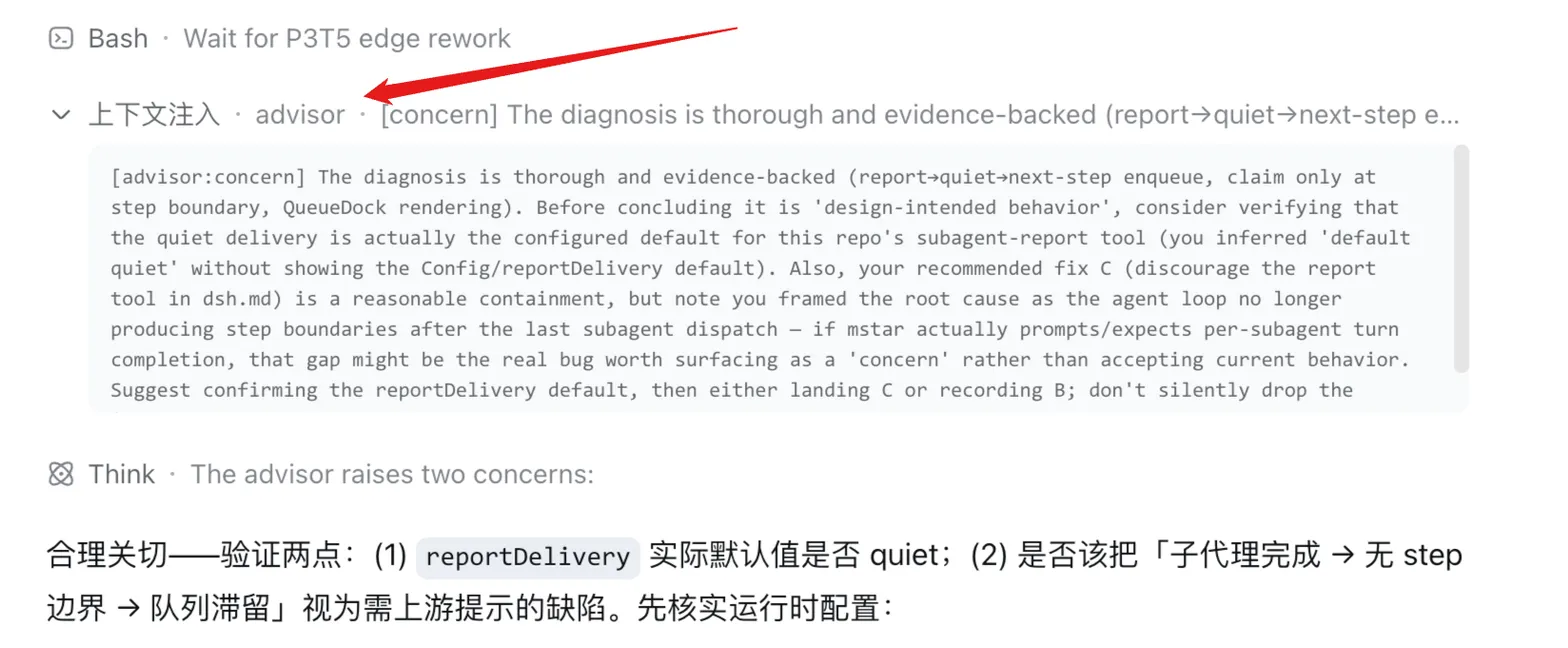
- Severity-ranked advice with inject/steer semantics: at most one note per review — nit (a minor style, clarity, or quality suggestion; delivered via non-waking
agent.inject, consumed at the next pre-step boundary), concern (a material risk or clearly better direction to weigh before continuing; delivered via wakingagent.steer, subject to theimmuneTurnscooldown), blocker (continuing clearly wastes work — contradicts an explicit user instruction, going in circles, fundamentally unsound; delivered viaagent.steer). Delivered messages carry the[advisor:{severity}]prefix and are self-described advisory content:
[advisor:concern] extract the helper into a module and unit-test it- Explicit model gate:
enableddefaults to off;enabled: truewithoutprovider+modelnever starts a model call — status reports disabled-with-reason. Unknown config keys are rejected. - Zero-tool minimal start: the reviewer is an independent model call only — no advisor tools, nothing it can do to the session besides advisory messages.
- No-stall failure policy: a failing or quota-limited advisor only drops its own bounded backlog — it can never park or pollute the primary loop.
- Session-scoped controls:
/advisor on|off|status|configwork per session; the toggles are ephemeral overrides, never persisted config.
Mount-only (no dsh modification)
The plugin installs as a pure mount: bundle insert + client card (web Settings 插件配置) + its own gateway channel (/api/advisor/get|set, claimed by the host's typertGateway — the same mechanism the dsh goals service uses, not gated by the settings exposure allowlist) + the /advisor commands — no dsh patches, no postinstall step, and dsh upgrades never require re-patching.
Limitations & roadmap
The MVP deliberately drops full omp parity. Accepted gaps (tracked in the harness iteration roadmap):
- Single advisor per session — no parallel advisor roster or WATCHDOG-style file discovery (next iteration).
- No advisor tools — the reviewer is an independent model call only; it cannot verify claims itself (next-next iteration).
- No in-session advisor panel — advice surfaces only as tagged injected messages; the web Advisor card is a config surface, not a session view (next-next iteration).
- No transcript persistence or cost stats — no resumable advisor history or cost observability (next-next iteration).
- No secret obfuscation of delta content — secrets present in the transcript can reach the advisor model; mitigate by configuring a trusted reviewer model.
- No quarantine of unsafe advisor output — a misbehaving note can carry directive text; the JSON frame + validation + advisory-only framing are the only mitigation, and the note is delivered as-is (roadmap).
- No
syncBacklogcatch-up wait — a far-behind advisor does not wait for the primary loop; its backlog is bounded and dropped, so notes may arrive after the next primary turn started (roadmap: context-maintenance batch). - Bounded advisor context — long-session full replays are truncated (
maxDeltaMessages), so the advisor may lose early context after compaction (roadmap: next-next iteration).
Documentation
| Doc | Content |
|---|---|
| docs/install.md | profile install (web + dsh-tui) / registry / git / tarball / local-directory variants / web Settings exposure / uninstall / --dump-config verification |
| docs/configuration.md | full advisor namespace reference: keys & defaults, explicit model gate (S4), settings surfaces (web card / patch layer / global settings.yaml), example YAML, live re-apply behavior |
| docs/consumer-api.md | developer consumption contract: package-root library API, dsh-advisor/client entry, /advisor command surface, export inventory, lifecycle |
| docs/verification.md | verification records: test matrix (16 files / 319 cases), typecheck/build, CI contract, real-environment steps |
| docs/release.md | release process: PR-driven Release prep + Release workflows, OIDC trusted publishing, version strategy, rollback |
License
Released under the MIT License — see LICENSE. The LICENSE file is authoritative for copyright and license terms.
