
dsh-perm-guard 🛡️


Auto-approval permission guard for DeepSeek Harness (dsh) web — the "middle tier" between workspace-write (asks too often) and danger-full-access (too open). Common operations like cross-directory edits, git commit/merge and builds run without approval prompts; destructive operations (deletes, disk ops, privilege escalation, curl|sh) always ask for human confirmation.
*Unofficial project: independently developed and maintained by a community member, not an official DeepSeek product.*
Screenshot

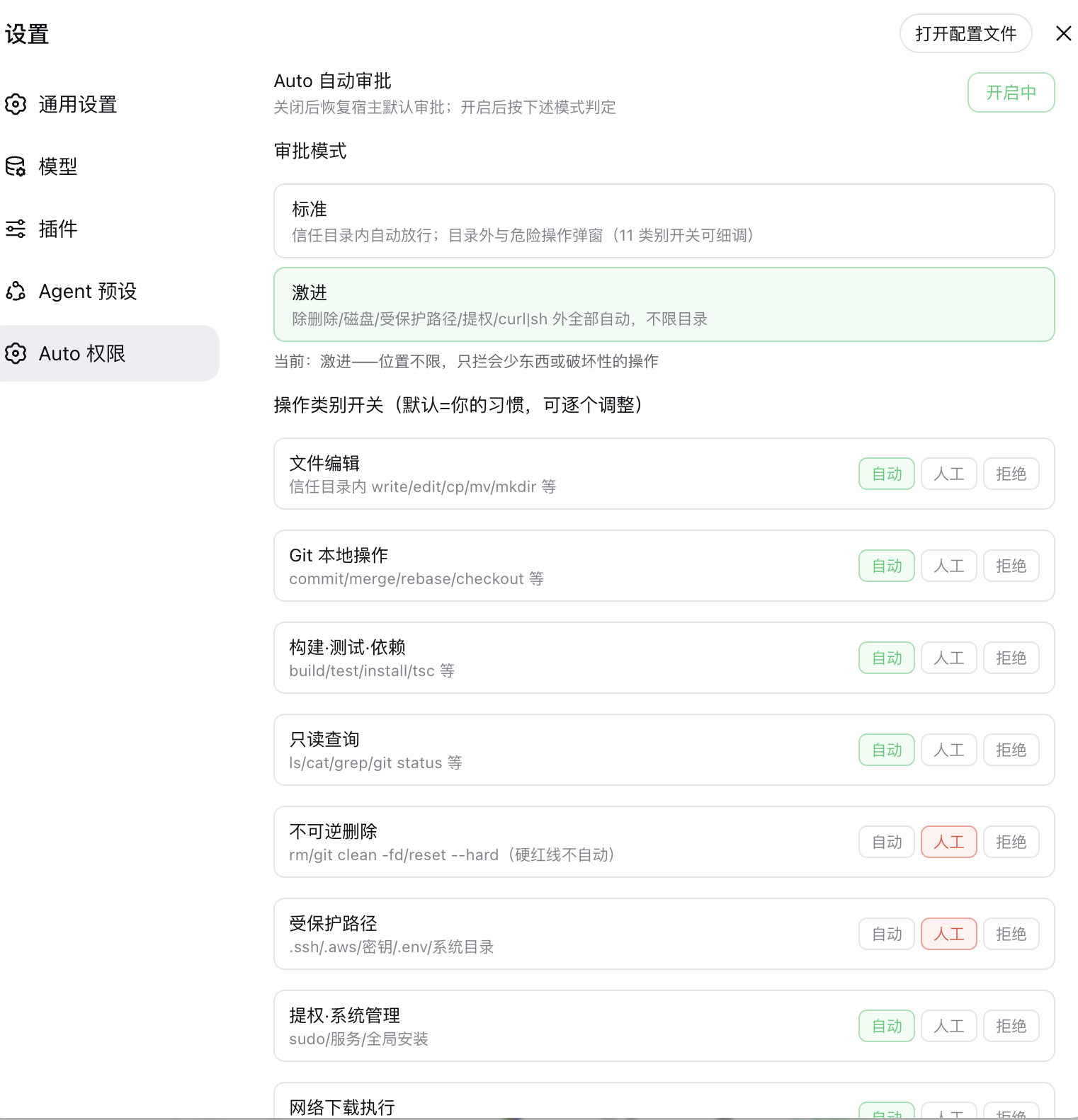
Features
- Two modes (switchable in the settings page, persisted):
- Standard — auto-approve inside the trust directories (workspace, sibling directories, custom list); outside + risky operations prompt.
- Aggressive — location-unrestricted: only destructive operations still prompt.
- 11 per-category tri-state switches (auto / ask / deny) with your personal defaults.
- Audit trail — every decision is recorded (approved / forwarded to human / rejected) with timestamp and command summary.
- Persistent config —
~/.dsh/perm-guard.json, survives restarts. Zero host dependencies.
Install
dsh plugin --profile web add "github:a903067276-rgb/dsh-perm-guard#main"Then restart dsh web. Update: dsh plugin --profile web update dsh-perm-guard, restart.
Manual install fallback: see docs/install.md.
Usage
- Auto button — in the composer tool row (left of the input box). Click to toggle auto-approval on/off (green = on). Off restores the host's default approval behavior completely.
- Settings → "Auto 权限" (Auto Permissions) — total switch, mode selection (Standard / Aggressive), 11 category switches, trust directory editor, and the recent-decision audit list.
- Rules apply to all sessions (including subagents) while enabled.
Mode defaults
| Category | Standard | Aggressive | |
|---|---|---|---|
| File edit (write/edit/cp/mv/mkdir) | auto (in trust dirs) | auto | |
| Git local (commit/merge/rebase/checkout) | auto | auto | |
| Build / test / install | auto | auto | |
| Read-only queries (ls/cat/grep/git status) | auto | auto | |
| Delete (rm, reset --hard, clean -fd) | ask | ask | |
| Protected paths (.ssh/.aws/secrets/.env/system dirs) | ask | ask | |
| Privilege (sudo, services, global installs) | ask | ask | |
| **Network download-execute (curl\ | sh)** | ask | ask |
| Git push | ask | auto | |
| Publish / deploy | ask | auto | |
| Disk / partition / device | ask | ask |
Switching modes resets the category switches to that mode's defaults (adjustable afterwards).
Never auto-approved (all modes)
- Deletion:
rm,rm -rf /or~(circuit breaker, even with$(...)variants),git reset --hard,git clean -fd,Remove-Item - Disk:
ddwriting devices,mkfs/fdisk/wipefs/diskutilerase, writes to/dev/ - Privilege:
sudo/su, service management (launchctl/systemctl), recursivechmod/chownon/or~ - Network download-execute:
curl|sh,wget|sh - Force push:
git push --force/-f(rewrites history) - Writes to protected paths
Platform support
| Platform | Status |
|---|---|
| macOS | ✅ development environment |
| Linux | ⚠️ expected to work |
| Windows | ✅ adapted & field-tested (win32 path handling + PowerShell vocabulary, 2026-08-24) |
Windows notes
- Trusted dirs accept three absolute-path styles —
C:\…,C:/…,/c/…(MSYS/Git-Bash) — normalized toC:/…on save; invalid entries are reported back by the UI instead of being silently dropped. - Classifier covers common PowerShell cmdlets: pipeline/formatting (
Select-Objectetc.) count as read-only;Invoke-RestMethod/iwrmap to network;Stop-Process,reg add,schtasks /createetc. map to privilege (always human-confirmed);vssadmin delete shadows,bcdedit,diskpartare hard red lines. ghCLI read-only subcommands (view/list/status…) auto-approve; write operations fall back to human confirmation.- Escalated retries (
sandbox_permissions) raise exactly one confirmation card instead of two.
Requirements
- DSH web >= 0.1.0-rc.6 (the approval system this plugin guards)
- Version compatibility (best effort — the settings card uses dual-field
key+idregistration to satisfy both rc.6 (id) and rc.7+ (key); verified locally on rc.6/rc.8/0.1.1-rc.2/0.1.5-rc.1, not guaranteed on every DSH version): - DSH 0.1.0-rc.6 and newer (incl. the 0.1.1 / 0.1.2 / 0.1.5 lines): try
main(default) orv0.2.9and newer. - Conservative fallbacks (the last pre-0.1.1 build): DSH 0.1.0-rc.7/rc.8 →
v0.2.7(dsh plugin add github:a903067276-rgb/dsh-perm-guard#v0.2.7); DSH 0.1.0-rc.6 → frozenrc6-compattag (no maintenance). - ⚠️ On DSH 0.1.5+ do not install
v0.2.8: it imports the removedsettingsNamespaceexport and makes the whole plugin tree fail to load (the web app will not boot). Usemain/v0.2.9+ instead. pnpmin PATH —dsh pluginis a pnpm forwarder (needed for install/update)- Maintenance policy: this plugin keeps evolving with the latest DSH releases; compatibility with older DSH versions is best-effort only and not guaranteed going forward.
How it works
- Interception before the host prompt — every approval request is intercepted before the host prompt; the actual command/target is classified, and safe operations are auto-answered
allowed-once(~13ms, no popup), risky ones are forwarded to the human prompt. - Call lookup — an approval request carries no tool arguments, so the plugin resolves the real arguments from the session log by
callId; DSH 0.1.5 removedSession.events, so it now reads the publicsnapshotEvents()(older hosts keep theeventspath). When neither is available it always falls back to the human prompt (safe default, never auto-allow). - Command-level firewall (
tools/pre-execute) — dangerous categories are intercepted *before* the sandbox even rejects them. - Classification pipeline — the two modes set per-category defaults (Standard: trust directories; Aggressive: location-unrestricted), and the 11 tri-state switches (auto / ask / deny) fine-tune each category.
- Audit + persistence — every decision is recorded with timestamp and command summary; approval decisions are always persisted via the host's
approval/asked+approval/decidedevent pair.
Notes
- DSH's sandbox has no OS-level network fence (unlike Codex): the plugin can only detect download-execute patterns (
curl|sh) in command text, not block other network traffic. - Terminal sessions, subagent creation, model calls and MCP tools are outside the approval system entirely.
- Commands whose *text* contains danger words (e.g. echoing
"Remove-Item", or scripts embedding rule sources) are conservatively intercepted — expected, rare in practice. - The audit list is in-memory (60 entries) and resets on restart; approval decisions themselves are always persisted via the host's
approval/asked+approval/decidedevent pair.
Coverage
- All approval entry points in DSH are covered:
bash,pwsh(PowerShell), and thewrite/editfile tools. MCP tools and other read-only tools have no approval mechanism and are unaffected. - Compound commands (
a && rm -rf x): pure-word chains are split and evaluated per subcommand, taking the strictest result; chains containing variables/redirection/wildcards are treated conservatively as one unit. - Unknown commands always fall back to "ask" regardless of mode (safe default) — the classifier never auto-allows what it cannot parse.
How it compares to Claude Code / Codex
| Claude Code | Codex | dsh-perm-guard | ||
|---|---|---|---|---|
| Read-only command set | built-in, not configurable | sandbox | built-in + configurable | |
rm -rf / ~ breaker | always prompts | sandbox blocks | always prompts (all modes) | |
| Protected paths | yes | .git/.agents/.codex | .ssh/.aws/secrets/system dirs/.git | |
| Network isolation | tool-level | OS-level (default off) | not available (DSH has no OS network fence; only `curl\ | sh` pattern detection) |
| Approval categories | 3 tool classes | 5 granular switches | 11 explicit switches + 2 modes | |
| Auditing | prompts only | logs | in-plugin audit + host approval/asked/decided events |
Configuration file
~/.dsh/perm-guard.json (created on first change):
{
  "enabled": true,
  "mode": "standard",
  "categories": { "fileEdit": "auto", "...": "..." },
  "trustedDirs": []
}trustedDirs: extra absolute paths auto-approved in Standard mode (default: workspace + its sibling directories).- Trust directories are ignored in Aggressive mode (location-unrestricted).
Development
# hot-plug testing (no restart)
# 1. define a dynamic Cordis plugin with the same decision logic
# 2. cordis_run → verify → cordis_stop

# static bundle (this repo layout)
# symlink to ~/.dsh/profiles/web/node_modules/dsh-perm-guard
# add "dsh-perm-guard" to ~/.dsh/profiles/web/package.json dsh.profile.bundles
# restart dsh web
Verification matrix: docs/verify-checklist.md
