
dsh-requirements-alignment
Stop long-running agents from quietly changing what you asked for.
让 DSH Agent 自己做工程决策,但别让它在长任务里悄悄改需求、扩范围、换架构。
dsh-requirements-alignment is a lightweight runtime drift guard for DeepSeek Harness (DSH). It turns the user's intent into a durable requirement baseline, stays out of the way while the agent works, and only interrupts when the next step would materially change the direction.
You decide the direction. The agent decides the engineering.
Current package: v0.4.2, targeting DeepSeek Harness 0.1.1-rc.2. Requires Node.js >=22.18.0.
The problem
Long-running coding agents are good at keeping momentum. That is also how they can drift.
A task may start as:
Fix the result-page filter.
Do not refactor backend logic.
Later the agent discovers that a cleaner solution would require backend changes. Without an explicit guardrail, it may simply expand the scope and continue.
Requirements Alignment changes that behavior:
User intent
   ↓
Durable requirement baseline
   ↓
Agent works normally
   ↓
Direction-changing step detected?
   ├─ No  → keep working silently
   └─ Yes → ask once → record decision → continue
What counts as drift
The plugin is interested in direction-level changes, not implementation trivia.
Typical drift candidates include:
- expanding or shrinking the approved scope;
- violating an explicit constraint;
- changing user-visible behavior;
- switching architecture or product form;
- invalidating a settled assumption;
- changing a previously approved user decision;
- taking a destructive path that changes the intended outcome.
It should not stop the agent to ask about variable names, helper placement, ordinary refactors inside the approved scope, or other routine engineering choices.
Requirements Alignment vs Plan Mode
Plan Mode asks:
"Is this the right implementation plan?"

Requirements Alignment asks:
"Are we still solving the right problem?"
Plan Mode helps before implementation starts. Requirements Alignment protects intent during execution.
They are complementary:
Plan → approve → execute → detect direction drift → re-align only when neededQuick start
Install into your DSH Web profile:
dsh plugin --profile web add dsh-requirements-alignmentThen use DSH normally.
Auto mode is the recommended default. Clear tasks continue with zero interruption. When a real direction change appears, the plugin surfaces one decision and records the result.
Use /align any time you want an explicit status check.
Three modes
| Mode | Behavior |
|---|---|
| Auto | Watches for direction-level drift and asks only when necessary |
| Manual | No automatic drift policy; use /align when you want a check |
| Off | Alignment capabilities are disabled for that session; /align-mode remains available so you can switch back |
Common commands:
/align
/align-mode
/align-mode auto
/align-mode manual
/align-mode off
/align-mode reset
Per-session control:
/align-mode session
/align-mode session auto
/align-mode session manual
/align-mode session off
/align-mode session reset
A session override changes only that session. Shared runtime settings remain separate.
Example
Stay inside the original scope
User:
Improve the result-page filter. Do not refactor backend logic.

Agent:
[works normally]

Agent discovers:
A complete fix would require backend changes.

Requirements Alignment:
[reports a drift candidate and asks]

User:
Stay within the current scope.

Agent:
[keeps the backend untouched and continues within the approved direction]
Approve a real direction change
User:
The app is single-user and local-only.

Later:
Make it work across devices.

Requirements Alignment:
[detects that accounts/cloud sync may change the architecture]

User:
Approve the direction change: multi-user with accounts and cloud sync.

Agent:
[records the new baseline revision and continues]
How it works
The plugin provides a small set of alignment primitives:
establish_baselinerecords the current goal, explicit constraints, must-preserve behavior, allowed scope and settled user decisions;report_driftsurfaces a material direction change, asks through DSH's native user-question path and records the exact decision;/alignreports current alignment status and requests a fresh inspection;/align-modechanges Auto / Manual / Off behavior without requiring you to uninstall the plugin.
Canonical alignment state is kept in durable sidecar storage instead of being mixed into normal DSH session events. That keeps resume/fork/compaction behavior stable and avoids turning the session log into a plugin-specific state database.
Runtime mode model
Effective mode follows this order:
valid session override
        ↓
valid persisted runtime override
        ↓
valid profile default
        ↓
auto
This means two live sessions can use different alignment modes without leaking state into each other.
Switching modes changes which alignment capabilities are active. It does not delete the requirement baseline or drift history.
Web UI
In supported DSH Web builds, the plugin includes a small floating alignment control that exposes the current session mode and shared mode without requiring manual profile edits.
The UI and /align-mode operate on the same underlying state, so they are intended to stay consistent.
Long-running tasks can wait and continue
When the agent genuinely needs your decision, the expected behavior is to wait instead of guessing.
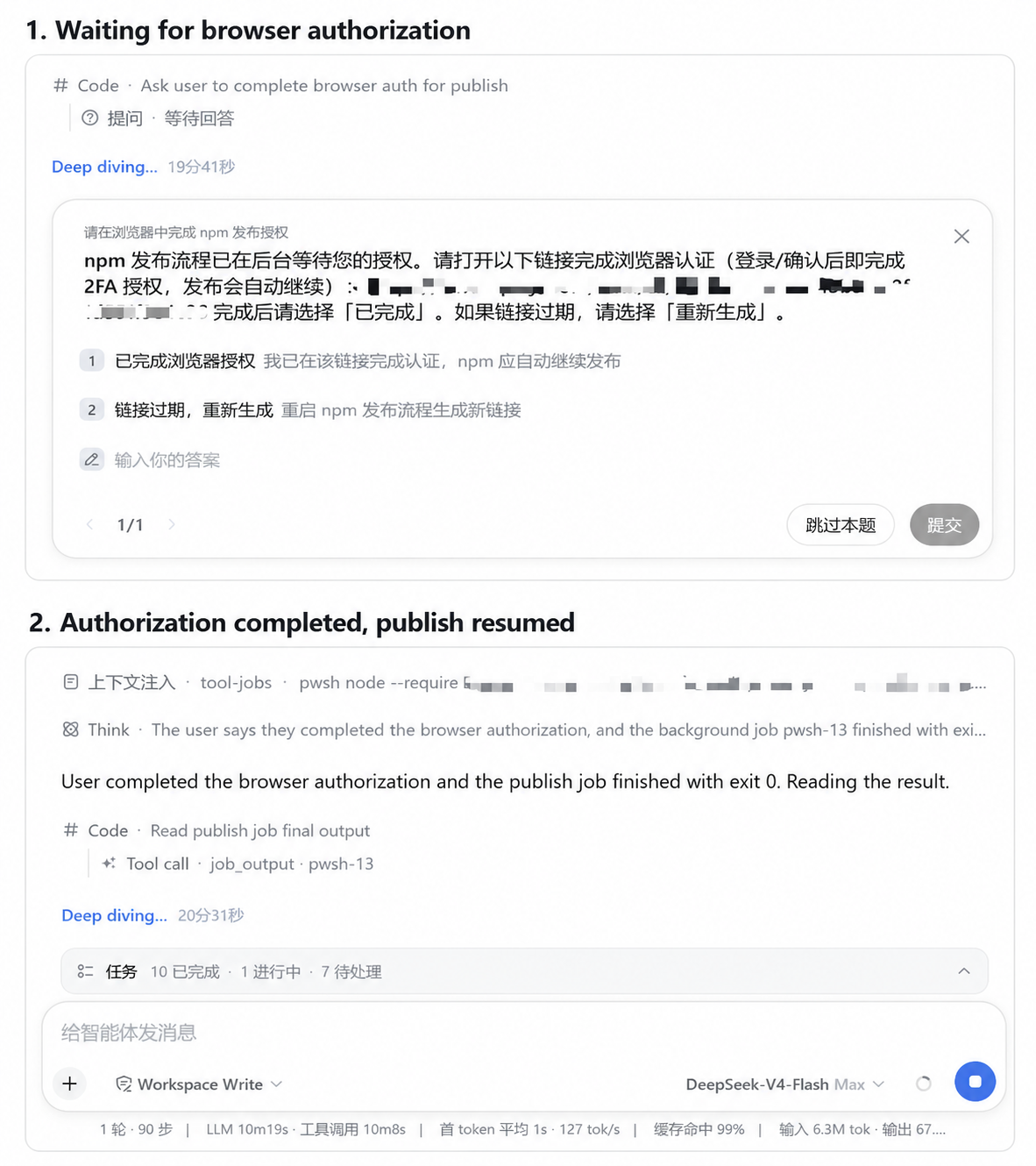
The same design principle applies to requirement drift: pause for the high-impact choice, record it, then continue from the new baseline.
What this plugin does not do
- It does not replace DSH Plan Mode.
- It does not turn every engineering choice into a user question.
- It does not require a full PRD or spec before work can start.
- It does not rewrite DSH core packages.
- It does not continuously interrupt clear tasks.
- It does not delete alignment state when modes change.
Uninstall
dsh plugin --profile web rm dsh-requirements-alignmentOff is not the same as uninstalling: Off keeps the plugin installed so the session can switch back to Auto or Manual at runtime.
Design goal
The project deliberately avoids becoming a full requirements-management system.
Its job is narrower:
Protect the few human decisions that define what is being built, then let the agent work.
Development focus
The implementation is designed around:
- durable baseline and drift state;
- session-scoped mode isolation;
- resume / fork / compaction continuity;
- hot mode switching without duplicate registrations or listener leaks;
- compatibility with normal DSH session semantics;
- minimal interruption when the requested direction is already clear.
License
MIT. See LICENSE.
