
Capability (能力库) — dsh-skill-mcp-manager
One-stop SKILL & MCP manager — a host-level plugin for DeepSeek Harness with MCP on-demand loading: no more worrying about too many MCP tools burning your tokens.
Screenshots
MCP management 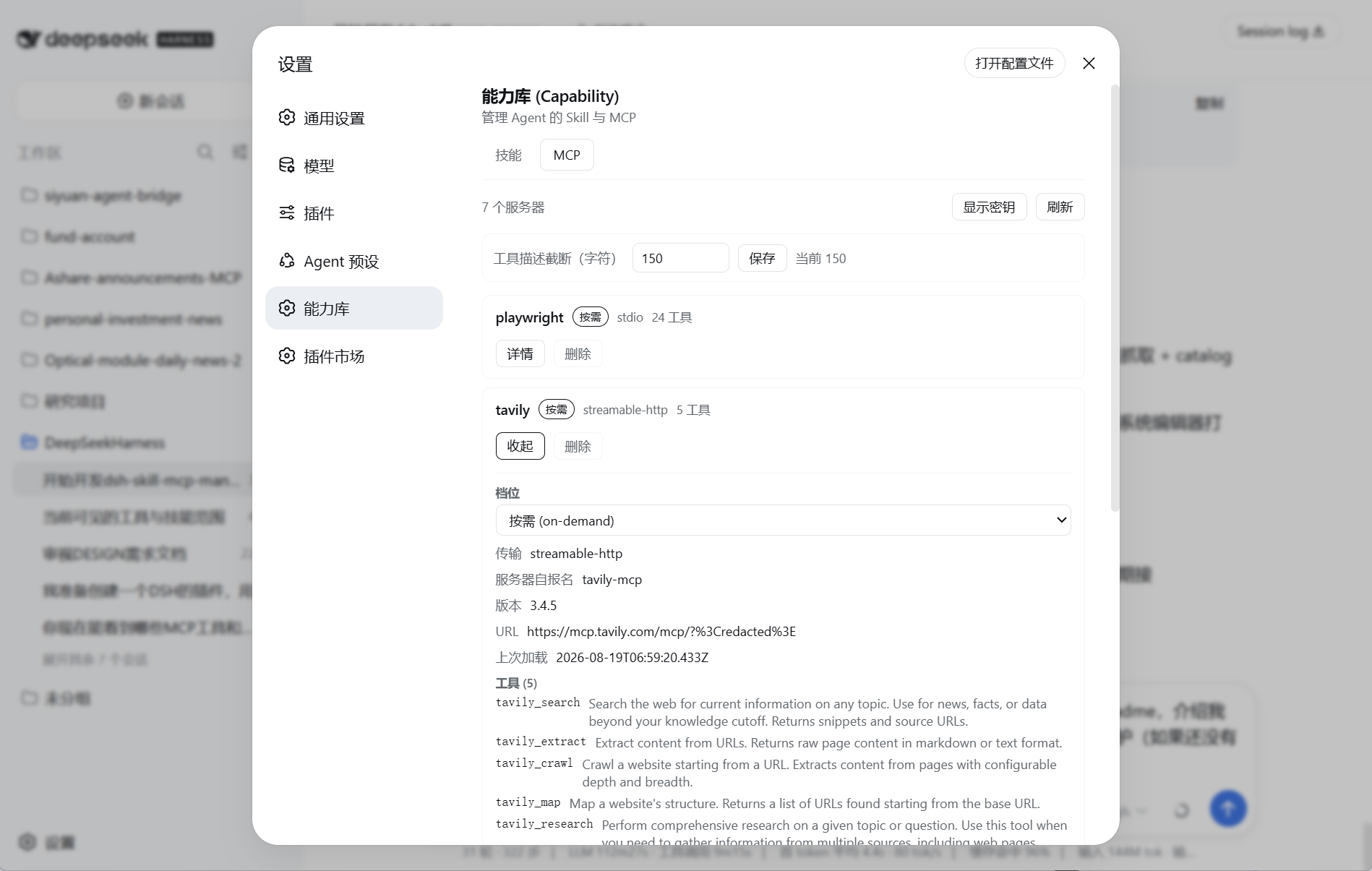
SKILL management 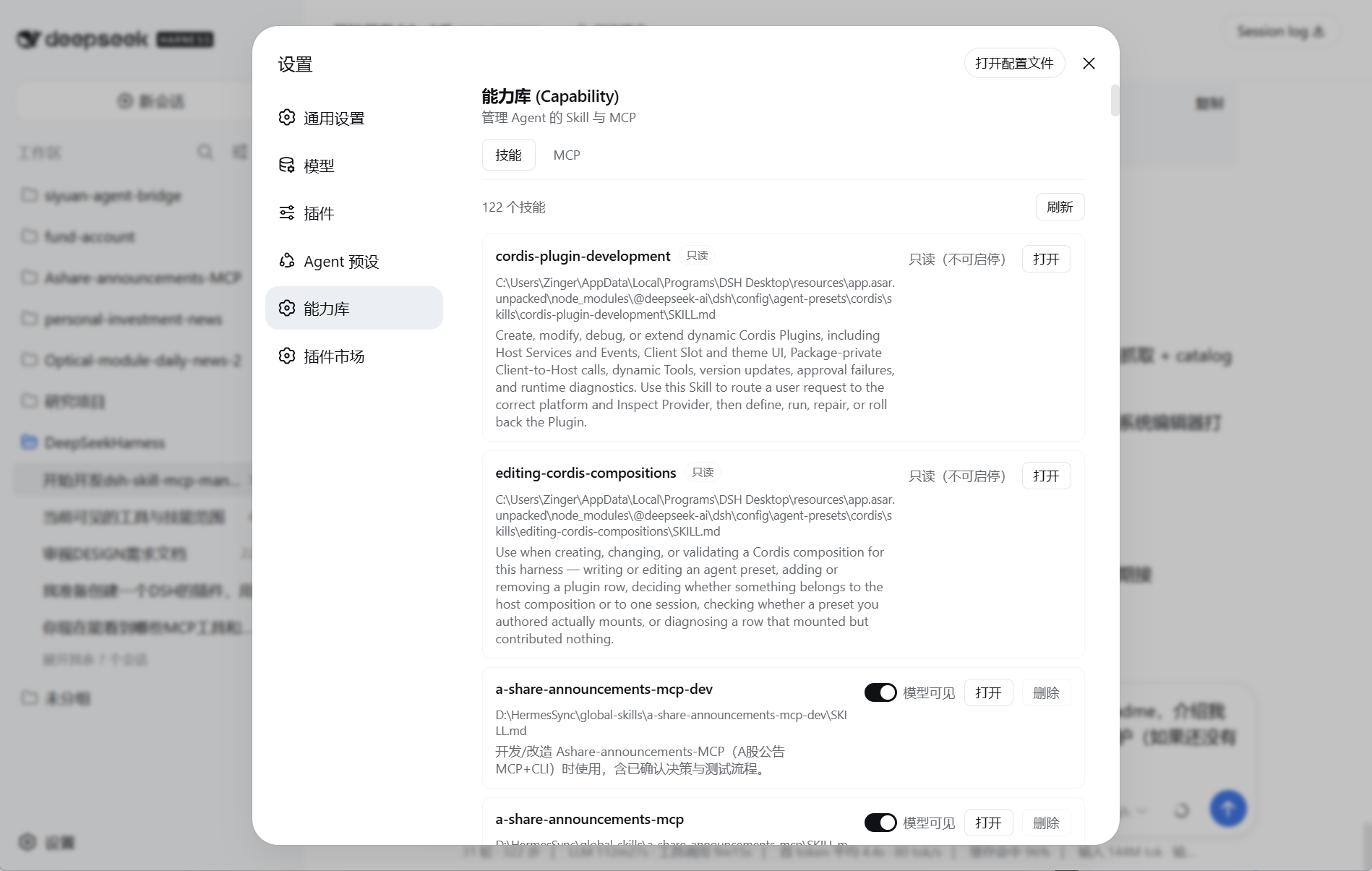
Core features
1. One-stop visual management
Which Skills and MCPs are installed? Are they enabled? What does each one do? All visible directly in the settings page — no digging through layers. Enable/disable and delete MCPs and Skills from the UI, and click a SKILL to view its source (opens with your local default markdown reader). Each MCP tool can also be enabled or disabled independently; a disabled tool cannot be called by the AI and does not affect other tools on the same server.
2. MCP on-demand loading (the core feature, carefully polished)
At session start, an on-demand server exposes only its name + short tool descriptions. The AI knows each tool exists and what it does, without the full schemas. That means:
- A balance between token bill and full context — exposing only the manager means everything else requires a tool call to inspect, which risks the AI never realizing something exists and never going to check what's available; but sending the full schemas bloats the context. This plugin treats MCP and SKILL the same way: it provides the basic name + description and lets the AI decide what to load.
- No startup latency — the server connects only when the AI actually needs it.
- No failed-load dead end — loading is on demand, and a failure is non-fatal (retry / reload later).
3. Per-session MCP instances
Every DSH session (including subagents) creates, holds, and disposes its own instance of each MCP config: stdio servers get one subprocess per session, HTTP servers one connection per session. When multiple sessions drive stateful tools like Playwright concurrently, each operates its own browser pages — no clobbering across sessions — and instances are automatically disposed when their session ends. Eager tools are registered by each session in its own context; MCP configuration (registry, tiers, per-tool disables, secrets, notes) remains globally shared.
4. In-session MCP hot reload
Updated your own local MCP server? Just mcp_load it in the session — reconnect, re-list tools, fresh snapshot. No new session, no DSH restart — extremely friendly to MCP development. The reconnect only affects the current session's instance; other sessions are untouched.
5. SKILL deep scan, external libraries, temporary hide
- Recursively discovers
<dir>/SKILL.mdat any depth — connect any number of external skill-library directories, at any depth, so you can group SKILLs flexibly. The plugin only scans<dir>/SKILL.md, so other files in a folder (e.g.readme.md,reference.md, backup files) are never picked up as skills. - Hiding a skill = invisible to the model (writes
disable-model-invocation), while your/nameslash command still works. - Delete moves the whole
<dir>/folder to the recycle bin — recoverable when needed.
Other helpful features
To make the plugin easy and reassuring to use, it also includes:
6. Native MCP config takeover — nothing lost on uninstall
On install it automatically takes over your existing MCP config: every @deepseek-ai/dsh-mcp-client row in the profile is imported into the registry and taken over (on-demand by default; already-disabled stays disabled).
Uninstall is safe: whenever an MCP is added, the plugin also syncs the MCP config into the original config file but keeps it disabled. /mcp prepare-uninstall flips those disabled MCPs back to enabled and hands every managed entry (with full config) back to the native client. Removing the plugin never loses your MCP config.
7. Your note on every MCP
Attach a user note to any MCP; it is shown to the AI in the session catalog and is never overwritten by server/developer updates. For example: *"If server A goes down, use server B as a backup."*
8. Auto warm-up
After install the plugin connects once to fetch real tool names and descriptions, so the catalog is immediately useful. The cache is refreshed automatically every time an MCP is loaded. Warm-up and snapshot refresh are one-shot trial connections — they close when done and never leave a live instance.
9. Validated registration
mcp_register trial-connects + lists tools before persisting — only correctly configured servers are admitted.
10. Profile-scoped only
The plugin only manages the profile it is installed into — no overreach, no misplacement.
Install
dsh plugin --profile <profile> add dsh-skill-mcp-managerThen add one row to that profile's cordis.patch.yml (see cordis.patch.example.yml):
- insert:
    - id: skill-mcp-manager
      name: 'dsh-skill-mcp-manager'
      config:
        dataDir: ''            # empty = ~/.dsh/skill-mcp-manager
        profile: web           # write the profile you want to manage
        trialTimeoutMs: 30000
        toolCallTimeoutMs: 60000
        catalogDescriptionMaxLength: 500
        toolDescriptionMaxLength: 150   # per-tool description truncation in the catalog (adjustable)
        importNativeMcp: true           # take over native dsh-mcp-client rows on boot
Restart the profile. The plugin lives in the Host composition, so the mcp_register / mcp_load / mcp_call trio is visible to every session in that profile; eager tools are registered by each session in its own context, and MCP runtime instances are per-session.
Takeover note: withimportNativeMcp: true(default), nativedsh-mcp-clientrows are imported into the capability library and disabled at the native layer — the capability library becomes the single entry point (three tiers,mcp-catalog, the UI). Run/mcp prepare-uninstallbefore uninstalling to hand the entries back.
Usage
In the UI
Open Settings → Capability:
- SKILL tab — every managed skill (bundle
SKILL.md), sorted by path: model-visibility switch, open in system editor, cross-platform delete. Skills shipped with the deployment (undernode_modules/app.asar) are read-only: view + open only. - MCP tab — every registered server with tier badges and tool counts: switch tier, inspect details (command / env / headers / tools), enable or disable individual tools (blacklist; newly discovered tools default to enabled), mask or reveal secrets, peek descriptions, refresh the shared tool snapshot, delete entries. Snapshot refresh trial-connects and updates the registry, then closes; it does not leave a live instance. Disabled tools are hidden from the AI and rejected again at the execution boundary. A setting row adjusts the catalog's tool-description truncation (default 150 chars).
Model-facing tools
The plugin provides three small, fixed tools to manage all on-demand MCPs.
mcp_register— add or modify an MCP entry. Trial-connects (30s) + lists tools, then persists; the server's own description / version / title / website / instructions are captured automatically. Reuse it to change tier / parameters / notes; only connection-contract changes re-connect.
mcp_register { name, tier?, transport, command?, args?, env?, cwd?, url?, headers?, notes? } tier ∈ eager | on-demand | disabled (default on-demand). notes is user-maintained and is not overwritten by developer MCP updates.
mcp_load { name, peek? }— load / hot-reload a server instance for the current session, returning full tool definitions + server-declared metadata; other sessions are unaffected.peek: trueonly reads the snapshot — no connect, no disconnect — handy when the AI forgot a tool's parameters and wants a quick peek without interrupting the MCP's live process. Especially friendly for stateful MCPs like browser automation.mcp_call { name, tool, args? }— invoke an on-demand tool (mustmcp_loadfirst) through the current session's loaded instance. Structuredargsonly — never shell text, never a temp file. Malformed shapes (missing/non-stringtool, non-objectargs) are rejected with the correct shape spelled out, never auto-unwrapped; failed calls (protocol errors and serverisErrorresults) echo backcalled MCP tool: <server>/<tool>plus the exactargumentssent so the model can self-correct.
Config
| Field | Default | Meaning |
|---|---|---|
dataDir | ~/.dsh/skill-mcp-manager | Registry/settings directory (~/ is expanded). |
profile | web | Profile whose cordis.patch.yml is reconciled. |
trialTimeoutMs | 30000 | Trial-connection timeout used by mcp_register / mcp_load. |
toolCallTimeoutMs | 60000 | Per tools/call timeout. |
catalogDescriptionMaxLength | 500 | Truncation for the server description in the catalog. |
toolDescriptionMaxLength | 150 | Truncation for each tool's description in the catalog (tool names always shown in full). Adjustable in the UI. |
importNativeMcp | true | On boot, import native dsh-mcp-client rows into the capability library and take them over. |
Data
~/.dsh/skill-mcp-manager/registry.json— authoritative MCP registry (version 1,entries[]).~/.dsh/skill-mcp-manager/settings.json— plugin settings (customRecursiveDirs,toolDescriptionMaxLength, …).~/.dsh/skill-mcp-manager/trash.log— delete audit.- Env values may be literals or
$VARreferences to the process environment.
Future directions
- MCP Resources & prompts support — currently only MCP tool calls are supported; other parts of the MCP protocol will be added later.
- Edit each MCP's note (notes) in the UI.
- View and edit SKILLs in the UI.
License
MIT
