
dsh-usage-meter-harness
A real-time usage / cost / balance meter plugin for DeepSeek Harness (DSH). See tokens, spending and real wallet balance right next to the chat input — for the official DeepSeek models and any custom model registered in DSH.
Install
Prerequisite (methods 1 & 2): the DSH CLI itself runs on pnpm — install it once per machine:
npm install -g pnpm(orcorepack enable), then verify withpnpm --version.
Pick one of the three methods. Methods 1 and 2 need pnpm (a one-time machine setup used by the DSH CLI itself): npm install -g pnpm or corepack enable.
Method 1 — npm registry via DSH CLI (needs pnpm)
dsh plugin --profile web add --verbose @faith1688/dsh-usage-meter-harness@latest(--verbose shows the install progress; drop it if you prefer a quiet install. @latest explicitly requests the newest release — always install this way.)
Method 2 — GitHub via DSH CLI (needs pnpm)
dsh plugin --profile web add --verbose github:faith1688/dsh-usage-meter-harness(--verbose shows the install progress.)
Method 3 — one-line installer, no pnpm (recommended)
npx -y @faith1688/dsh-usage-meter-harness@latestOne command: installs into the DSH web profile and registers the bundle (idempotent). (@latest explicitly requests the newest release — always install this way.)
Prefer not to use npx? The same logic ships as scripts in the repo:
Windows (cmd):
curl -fsSL https://raw.githubusercontent.com/faith1688/dsh-usage-meter-harness/main/scripts/install.cmd -o "%TEMP%\um-install.cmd" && "%TEMP%\um-install.cmd"Linux / macOS:
curl -fsSL https://raw.githubusercontent.com/faith1688/dsh-usage-meter-harness/main/scripts/install.sh | shThe script does everything for you: cd into the DSH web profile, installs the package with visible progress, and registers the bundle in dsh.profile.bundles (idempotent — safe to re-run after upgrades).
Note: Method 3 uses plain npm and does not do pnpm coordination. If yourprofile is managed with pnpm (the default for dsh plugin), prefer Method 1.After any method: restart dsh web.
Updating
Two cases — pick the right one:
Fresh install (never had the plugin), or the npx method: just run the install command; it always fetches the latest release.
Upgrading an existing install (plugin already present): the profile's package.json / pnpm-lock.yaml may be pinned to an old version, and a bare add can be skipped by pnpm as "already satisfied". Always ask for the new version explicitly:
dsh plugin --profile web add @faith1688/dsh-usage-meter-harness@latestor, from inside the profile directory (~/.dsh/profiles/web):
pnpm update @faith1688/dsh-usage-meter-harness(You may also pin an exact version, e.g. [email protected].)
If your package.json binds the plugin via a file: path or a pin that add won't override (you see Already up to date / downloaded 0), use the one-line installer instead — it always requests @latest, which rewrites the binding to ^<latest> and upgrades in a single command:
npx -y @faith1688/dsh-usage-meter-harness@latest(Re-running this same command is the permanent update path: it is idempotent and upgrades regardless of whether you currently bind via file:, a pin, or ^.)
After updating: restart dsh web (or reload the browser page). Note that restarting alone never fetches a new version — it only reloads what is already in node_modules.
Why this never duplicates the mount entry and never touches your config:
- The mount entry lives inside the package (
cordis.patch.yml, the
dsh.bundle mechanism). Every release ships its own complete entry; DSH reads it from the installed package at startup — installing a newer package automatically brings the correct entry with it.
- Installers only edit the profile's
package.json(dsh.profile.bundles,
de-duplicated) and node_modules. They never write the profile-root cordis.patch.yml, so anything you added there yourself (or your other plugin configs) stays untouched.
- A duplicate mount entry can only happen if you manually added the same
idto
the profile-root cordis.patch.yml yourself — the installers never do that.
Features
Conversation usage card (next to the chat input)
| Feature | Description |
|---|---|
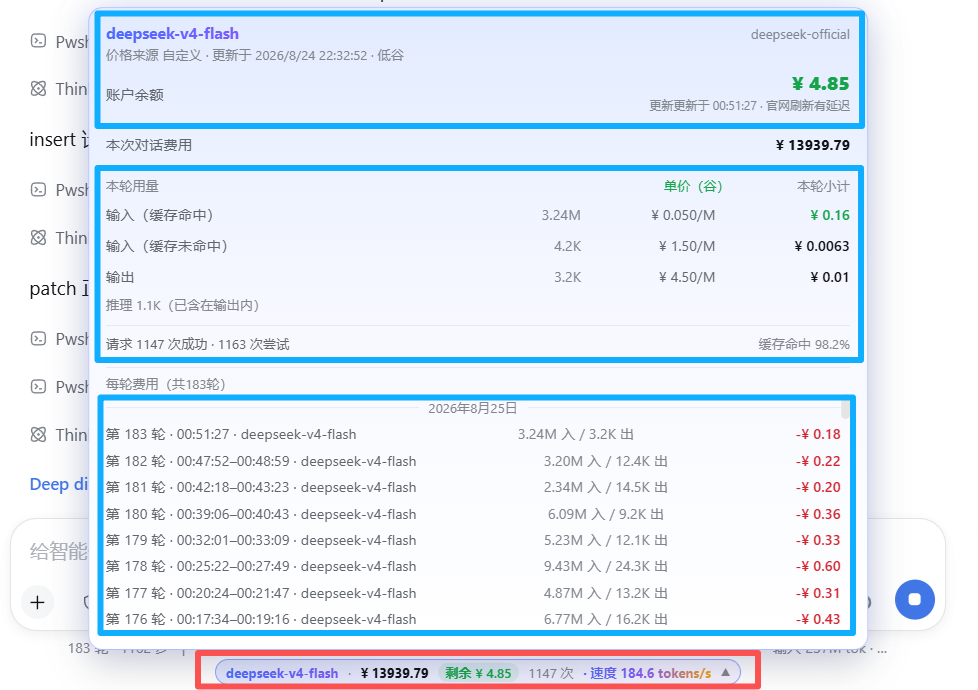
| Live cost | Session cost in CNY or USD, updated every step |
| Token breakdown | Input (miss) / cache hit / cache write / output |
| Turn usage panel | Per-turn subtotals with unit prices tagged peak/off-peak |
| Token speed | Live tokens/s while streaming; resets cleanly when output stops or tools run |
| Cache hit rate | Share of cached tokens for the session |
| Account balance | Real DeepSeek wallet balance; local-ledger estimate for other providers |
| Budget & remaining | Set a budget, see used / remaining / over-budget |
Billing engine
| Feature | Description |
|---|---|
| 6 billing templates | Basic · Cache hit/miss · Peak/off-peak (DeepSeek official hours) · Cache write+hit · Combined input+output · Batch half price |
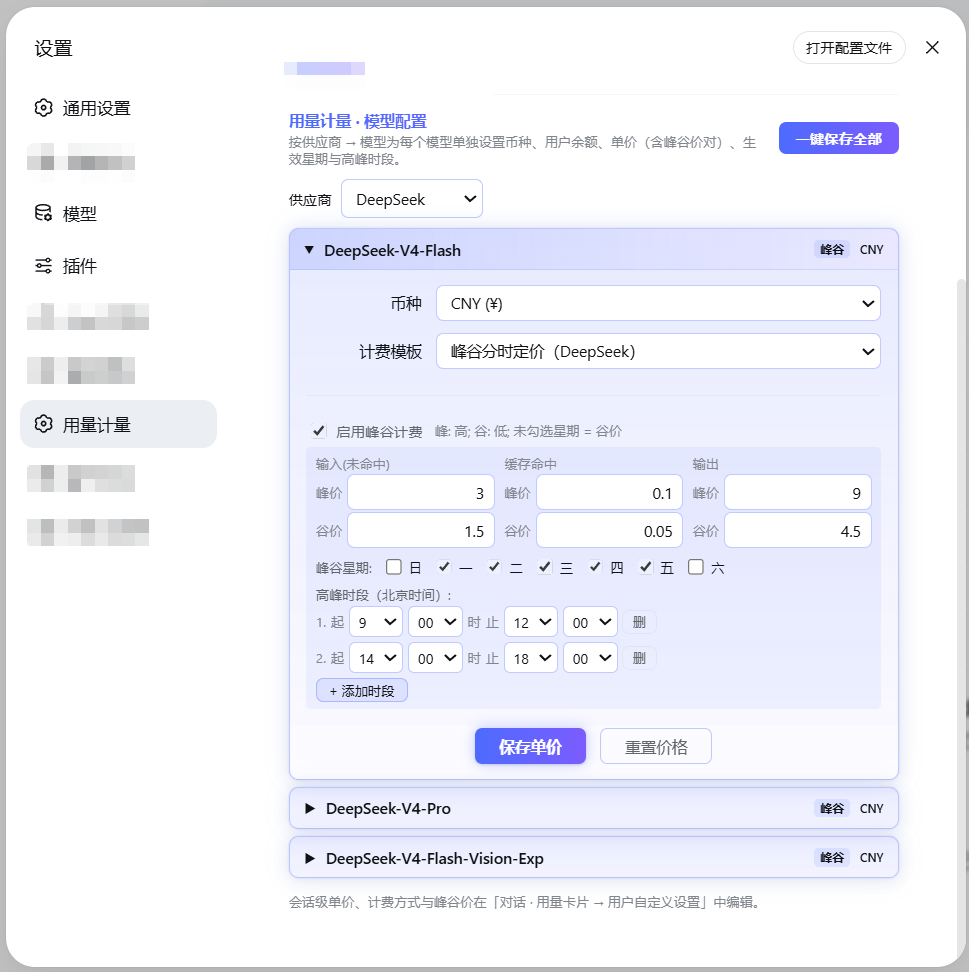
| Custom price rows | Up to 4 user-defined rows; the popup mirrors your setup verbatim |
| Peak/off-peak billing | Beijing-time weekday + hour windows, cross-midnight supported; each request is billed by its start time |
| Per-model pricing | Currency (CNY/USD), unit prices and balance per model |
| Shared provider wallet | One balance shared by all models of a provider — single checkbox |
| Official price prefill | DeepSeek official models come pre-filled with official prices and the official peak schedule |
| Built-in price table | 137 models across 19 vendors bundled; optional LiteLLM-shaped remote price source |
| Exchange rate | USD→CNY fetched automatically, refreshed when older than 24 h |
| Legacy migration | Old manual initial-balance/top-up settings migrate into provider wallets automatically |
Settings & UX
| Feature | Description |
|---|---|
| Bilingual UI | 中文 / English switch at the top-right of the settings page; applies everywhere instantly (popup included). Display only — saved data never changes |
| In-use lock | While a model is generating, its editor is locked so a running turn keeps consistent prices |
| WYSIWYG popup | Usage-card rows are copied verbatim from your template selection |
| Non-intrusive | Standard DSH cordis plugin; touches no other plugin and no DSH core files |
Supported models
- DeepSeek official models (
deepseek-chat,deepseek-reasoner, …): official
prices pre-filled; real wallet balance via API Key.
- Any custom model registered in DSH (OpenAI-compatible providers, Ollama,
OpenRouter, …): set unit prices and balance yourself; everything else works the same.
Screenshots
Settings page:
Usage popup:
Configuration
All settings live in the usage-meter settings namespace and can be edited directly in the plugin UI:
| Key | Type | Default | Description |
|---|---|---|---|
currency | string | CNY | Display currency |
budget | number | – | Session budget; shows "remaining" when set |
priceSourceUrl | string | – | LiteLLM-shaped price JSON URL; optional |
refreshIntervalMs | number | 4 h | Price / balance / rate refresh interval |
deepseekApiKey | secret | – | Only used to query the DeepSeek balance (stored AES-encrypted; never read from the DEEPSEEK_API_KEY env var) |
Compatibility
- Node.js ≥ 22.
- Peer versions track the supported DSH releases (see
package.json); updating
DSH does not break the plugin, and it never modifies your other plugins.
License
MIT © faith1688
Privacy
- The plugin makes no telemetry and no analytics calls.
- Network requests are limited to two optional ones: querying the **official
DeepSeek balance API** with the API key you configure yourself, and fetching a public USD→CNY exchange rate. Nothing else leaves your machine.
- The source is MIT-licensed and fully readable on GitHub.
