
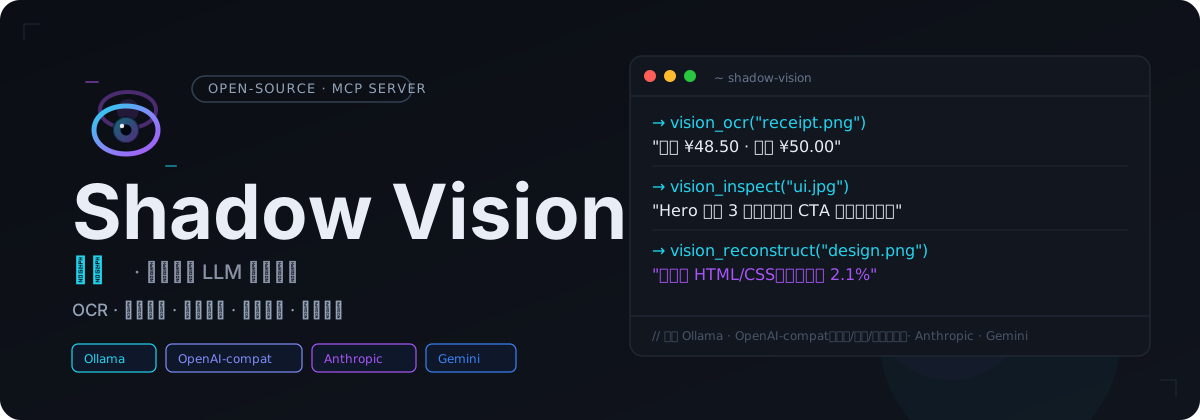
Shadow Vision
English | 简体中文
Give text-only LLMs a pair of eyes. Shadow Vision is an open-source MCP vision service that enables AI Agents to see, understand, and analyze real-world information through vision_ocr, vision_inspect, vision_annotate, vision_layout, vision_reconstruct, and vision_compare — without switching host models.
Why It's Different
- MCP-Native: Compatible with Codex, Claude Desktop, Cursor, and other MCP clients
- Pluggable Backends: Ollama, OpenAI-compatible, Anthropic, Gemini
- Local-First: Keep images and inference entirely on your machine when using Ollama
- Versatile Input: Supports local file paths, base64 image data, or remote HTTP(S) URLs
How It Works
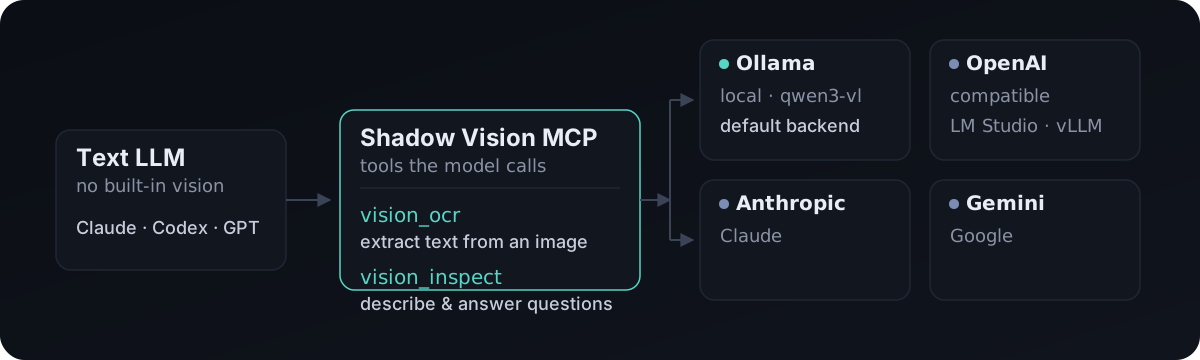
The text model calls Shadow Vision tools via MCP. Shadow Vision forwards the image and prompt to the configured vision backend and returns the text result back to the model.
Quick Start
0. One-Click Run (No Clone Needed)
No need to clone the repository. Run directly:
uvx shadow-vision          # Python / uv users (recommended)
# Or for Node users
npx shadow-vision       # Requires uv installed locally
MCP configuration example:
[mcp_servers.vision]
command = "uvx"
args = ["shadow-vision"]
env = { VISION_BACKEND = "ollama", VISION_MODEL = "qwen3-vl:2b-instruct" }
npx shadow-visionis a thin wrapper that invokesuvx shadow-visioninternally and requires uv installed on your machine. Both entry points behave identically.
1. Install from Source (Development / Self-Hosting)
Requires Python 3.11+ and uv:
git clone https://github.com/WardLu/shadow-vision.git
cd shadow-vision
uv sync
2. Use Local Ollama (Recommended for Beginners)
First install Ollama. If not running the Ollama desktop app, start the service manually:
ollama serve
ollama pull qwen3-vl:2b-instruct
ollama list
qwen3-vl:2b-instruct is the default vision model (non-thinking version, faster response). If you need stronger reasoning/thinking capability, switch to qwen3-vl:2b (thinking version); or change VISION_MODEL to any other vision model listed in ollama list.
3. Register as an MCP Service
Codex can run directly:
codex mcp add vision -- uv run shadow-visionOr add to ~/.codex/config.toml:
[mcp_servers.vision]
type = "stdio"
command = "uv"
args = ["run", "shadow-vision"]
cwd = "/path/to/shadow-vision"
env = { VISION_BACKEND = "ollama", VISION_MODEL = "qwen3-vl:2b-instruct", OLLAMA_URL = "http://127.0.0.1:11434/api/chat" }
After restarting your MCP client, simply ask the model to "take a look at this image".
Switching Models and Backends
VISION_BACKEND determines how requests are routed, and VISION_MODEL specifies the vision model. Update the environment variables in your MCP configuration and restart your client.
Switch to a local model:
env = { VISION_BACKEND = "ollama", VISION_MODEL = "your-downloaded-vision-model", OLLAMA_URL = "http://127.0.0.1:11434/api/chat" }Switch to an OpenAI-compatible service:
env = { VISION_BACKEND = "openai_compatible", VISION_MODEL = "provider-vision-model-name", OPENAI_API_BASE = "https://api.example.com/v1", OPENAI_API_KEY = "sk-...", OPENAI_MAX_TOKENS = "1024", OPENAI_MAX_TOKENS_FIELD = "max_tokens" }OPENAI_* denotes the OpenAI Chat Completions compatible protocol, which also applies to LM Studio, vLLM, and any other service offering /v1/chat/completions.
Free vision example for Chinese platforms (Zhipu GLM-4V-Flash):
env = { VISION_BACKEND = "openai_compatible", VISION_MODEL = "glm-4v-flash", OPENAI_API_BASE = "https://open.bigmodel.cn/api/paas/v4", OPENAI_API_KEY = "your-zhipu-key" }Other OpenAI-compatible providers only require modifying OPENAI_API_BASE and VISION_MODEL: SiliconFlow https://api.siliconflow.cn/v1, Alibaba Bailian https://dashscope.aliyuncs.com/compatible-mode/v1, StepFun https://api.stepfun.com/v1, Tencent Hunyuan https://api.hunyuan.cloud.tencent.com/v1, Moonshot https://api.moonshot.cn/v1, etc.
Privacy Notice: API backends (including third-party platforms) send image content as base64 to the respective provider's servers. For confidential or sensitive images, use the local ollama backend to prevent external data transfer.Configuring Backends
General Variables
| Variable | Default | Description |
|---|---|---|
VISION_BACKEND | ollama | ollama / openai_compatible / anthropic / gemini |
VISION_MODEL | qwen3-vl:2b-instruct | Vision model name |
VISION_TIMEOUT | 180 | Read timeout (seconds), compatibility alias for VISION_READ_TIMEOUT |
VISION_CONNECT_TIMEOUT | 10 | Connect timeout (seconds) |
VISION_READ_TIMEOUT | 180 | Read timeout (seconds) |
VISION_MAX_RETRIES | 2 | Retry attempts for transient / 5xx errors (total requests = 1 + this value) |
VISION_RETRY_BASE_DELAY | 1.0 | Exponential backoff base delay in seconds |
Advanced Configuration (Images & Security)
| Variable | Default | Description |
|---|---|---|
VISION_AUTO_COMPRESS | true | Whether to automatically compress large images |
VISION_MAX_LONG_EDGE | 1800 | Compression threshold: long-edge pixels |
VISION_MAX_PIXELS | 3500000 | Compression threshold: total pixels |
VISION_COMPRESS_QUALITY | 85 | JPEG re-encoding quality |
VISION_AUTO_TILE | true | Whether to automatically tile extra-long images |
VISION_TILE_LONG_EDGE | 3600 | Tiling threshold: long-edge pixels |
VISION_TILE_OVERLAP | 100 | Tiling overlap pixels |
VISION_MAX_TILES | 8 | Maximum number of tiles per image |
VISION_TASK_ROUTING | true | Whether to enable heuristic task routing for vision_inspect |
VISION_ALLOW_REMOTE_URL | true | Whether to allow remote URL image inputs |
VISION_MAX_REMOTE_SIZE | 20971520 | Maximum remote image size in bytes (20MB) |
VISION_FETCH_TIMEOUT | 30 | Remote fetch timeout (seconds) |
VISION_SSRF_ALLOW_PRIVATE | false | Whether to allow private / intranet addresses (strongly discouraged) |
VISION_MAX_BATCH_IMAGES | 5 | Maximum number of images per vision_compare call |
Ollama
| Variable | Default | Description |
|---|---|---|
OLLAMA_URL | http://127.0.0.1:11434/api/chat | Ollama chat endpoint |
Run ollama pull <vision-model-name> before use to download the model.
OpenAI-compatible
| Variable | Default | Description |
|---|---|---|
OPENAI_API_BASE | http://127.0.0.1:11434/v1 | Compatible service base URL |
OPENAI_API_KEY | empty | Usually left blank for local services |
OPENAI_MAX_TOKENS | unset | Optional max output tokens; omits token limit field when unset |
OPENAI_MAX_TOKENS_FIELD | max_tokens | Optional: max_tokens or max_completion_tokens |
Different providers support different token limit fields: use max_tokens for legacy fields, max_completion_tokens for newer APIs, or leave OPENAI_MAX_TOKENS unset if neither is accepted. Legacy environment variables VISION_API_BASE, VISION_API_KEY, VISION_MAX_TOKENS, and VISION_MAX_TOKENS_FIELD remain supported for backward compatibility.
Anthropic / Gemini
VISION_BACKEND=anthropic ANTHROPIC_API_KEY=sk-ant-... VISION_MODEL=your-claude-vision-model uv run shadow-vision
VISION_BACKEND=gemini GEMINI_API_KEY=AIza... VISION_MODEL=your-gemini-vision-model uv run shadow-vision
Anthropic also supports ANTHROPIC_BASE_URL, ANTHROPIC_VERSION, and ANTHROPIC_MAX_TOKENS; Gemini also supports GEMINI_BASE_URL and GEMINI_MAX_TOKENS.
Tools
vision_ocr
Extract text from screenshots, invoices/receipts, documents, or tables:
vision_ocr(image_path="/tmp/receipt.png")vision_inspect
Describe an image, or answer questions about an image:
vision_inspect(image_path="/tmp/design.png", question="List any UI bugs you see.")Both tools also support:
task: Optional task guidance (vision_ocr:general/error/table;vision_inspect:general/ui_structure/ui_bug/chart)image_path: Server-readable local image pathimage_base64+mime_type: Base64-encoded image dataimage_url: Remote HTTP(S) image URL (with automatic SSRF protection)
All image tools accept one of image_path / image_base64 / image_url as input, with precedence: image_base64 > image_path > image_url.
vision_annotate
Identify bounding boxes, arrows, underlines, highlights, strikethroughs, handwritten notes, and other user annotations. Outputs structured JSON with annotation → target relationships, types, bounding boxes (bbox), and confidence scores:
vision_annotate(image_path="/tmp/marked.png", focus="Explain changes in order of markup")vision_layout
Analyze image and UI layout structure, outputting structured JSON with canvas, containers, element bounding boxes (bbox), typography styles, and element hierarchy:
vision_layout(image_path="/tmp/ui.png")vision_reconstruct
Reconstruct screenshots into code (html / react / svg), generating markup along with model self-inspection. Optionally provide JSON from vision_layout as layout reference:
vision_reconstruct(image_path="/tmp/ui.png", target_format="html", reference_layout="<layout json>")vision_compare
Analyze multiple related images in a single call (diff / compare / sequence), with optional per-image label for easy reference:
vision_compare(images=[{"image_path": "/tmp/a.png", "label": "before"}, {"image_path": "/tmp/b.png", "label": "after"}], task="diff")Local Model Selection and Benchmarking
The Ollama model library lists download size, context window, and vision capabilities, but model package size does not represent minimum memory requirements. It is recommended to start with qwen3-vl:2b-instruct (non-thinking version, low latency); if OCR or complex chart comprehension is insufficient, benchmark against qwen3-vl:4b, qwen3-vl:8b, or document-OCR oriented minicpm-v4.5:q4_0.
Prepare 3–5 real-world images covering OCR, UI screenshots, charts, and hard edge cases, and compare models using identical prompts:
MODEL=qwen3-vl:2b-instruct
IMAGE=/absolute/path/to/test.png

time ollama run "$MODEL" "$IMAGE" "Transcribe all text from the image accurately, outputting only the text."
time ollama run "$MODEL" "$IMAGE" "Describe the image contents and list any areas of uncertainty."
Track OCR error count, accuracy of key objects and relationships, hallucinations, full round-trip latency, and processor status in ollama ps. Testing Ollama directly first before testing through vision_ocr / vision_inspect via MCP helps distinguish model capability limits from MCP configuration issues.
Recommended resources:
- Ollama Vision Documentation
- Ollama Qwen3-VL Model Page
- Qwen3-VL Official Repository
- MiniCPM-V 4.5 Official Evaluation
- Ollama Context Length Documentation
- Ollama Modelfile Documentation
Supported Agents
All agents launch the same command: uv run shadow-vision.
| Agent | Configuration File |
|---|---|
| Codex | ~/.codex/config.toml |
| Claude Code | .mcp.json |
| Cursor | .cursor/mcp.json |
| VS Code Copilot | .vscode/mcp.json |
| Windsurf | .windsurf/mcp_config.json |
| Claude Desktop | claude_desktop_config.json |
| OpenCode | opencode.json |
Development
uv sync
uv run python -c "import vision_mcp.server; print('ok')"
uv run pytest
Contact
If you are interested in B2B products, AI product development, supply chain digitization, or Shadow series products, feel free to get in touch:
- X (Twitter): @Gollumgulu
- WeChat Official Account: Ward 的 AI 产品实战
- Xiaohongshu / Weibo / Douyin: "Ward 的 AI 产品实战" across platforms — Xiaohongshu · Weibo · Douyin
- Product Homepage: Shadow Nexus
- Email: [email protected]
Open for 1-on-1 consulting and advisory: Product Diagnostics · AI Implementation · Workflows / Skills · Custom Solutions
License
MIT
