
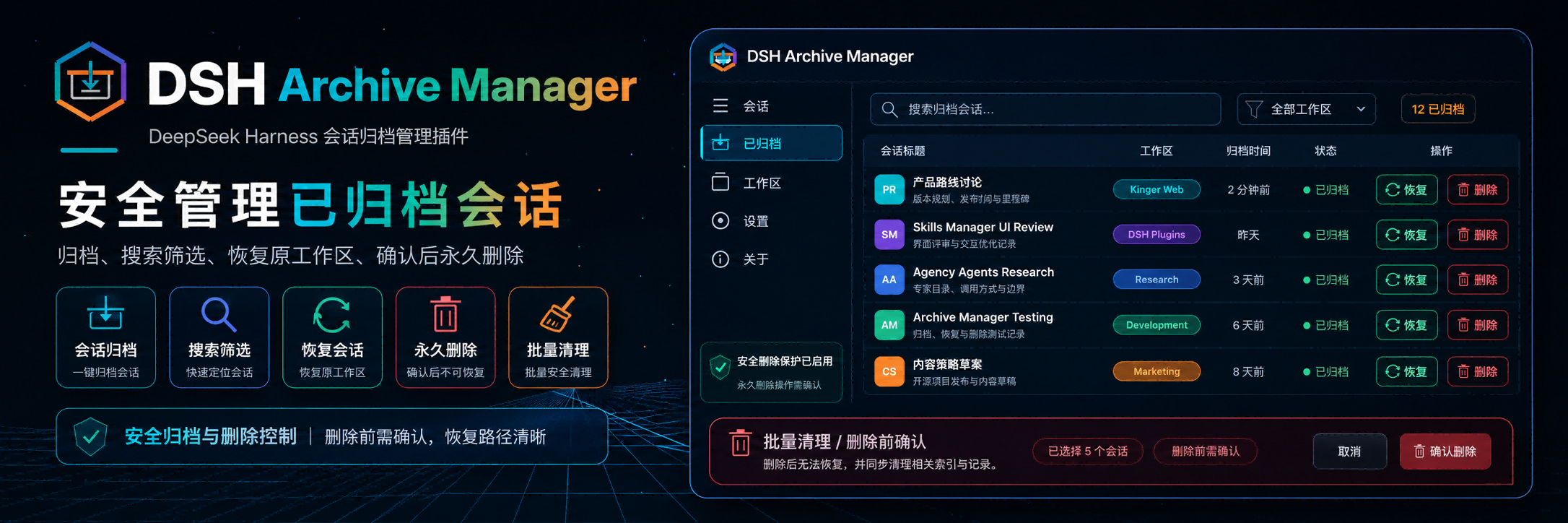
DSH Archive Manager
Safely manage archived sessions in DeepSeek Harness
简体中文 · Changelog · Apache-2.0





DSH Archive Manager is a community-maintained DeepSeek Harness (DSH) plugin, not an official DeepSeek AI product.
Features
Put inactive conversations away and find them again when needed. Search, restore, and clean up archives in one place while keeping everyday task lists tidy.
- Put finished tasks away: archive one conversation or all active chats in a workspace.
- Find past work: search titles, filter by project, and sort by time or title in Settings → Archived sessions.
- Resume your work: restore one conversation, a project group, or all archived chats.
- Clean up records: permanently delete individual chats or batches after confirmation. Permanent deletion cannot be undone.
Screenshots
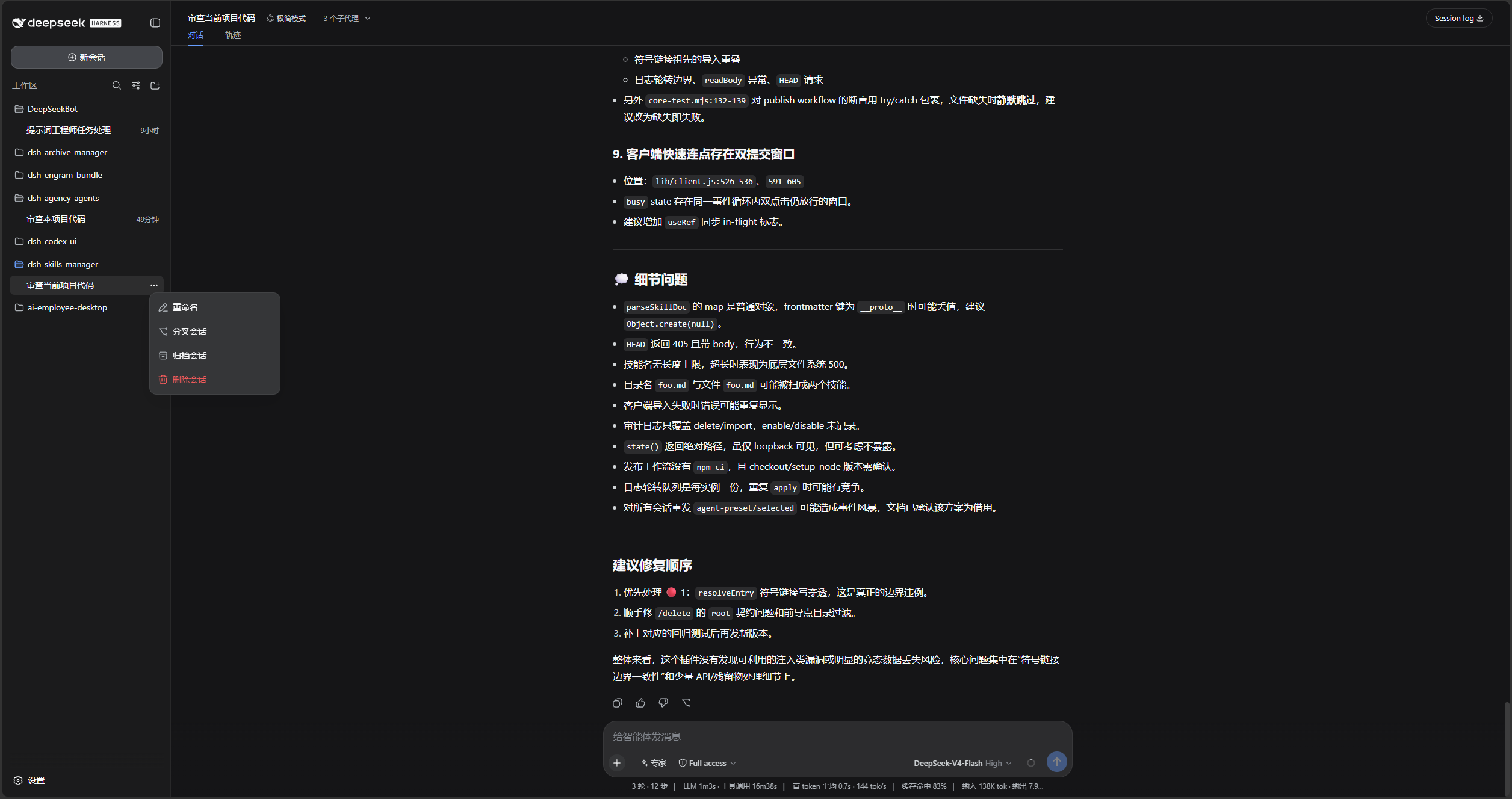
Open the sidebar session menu and choose Archive session:
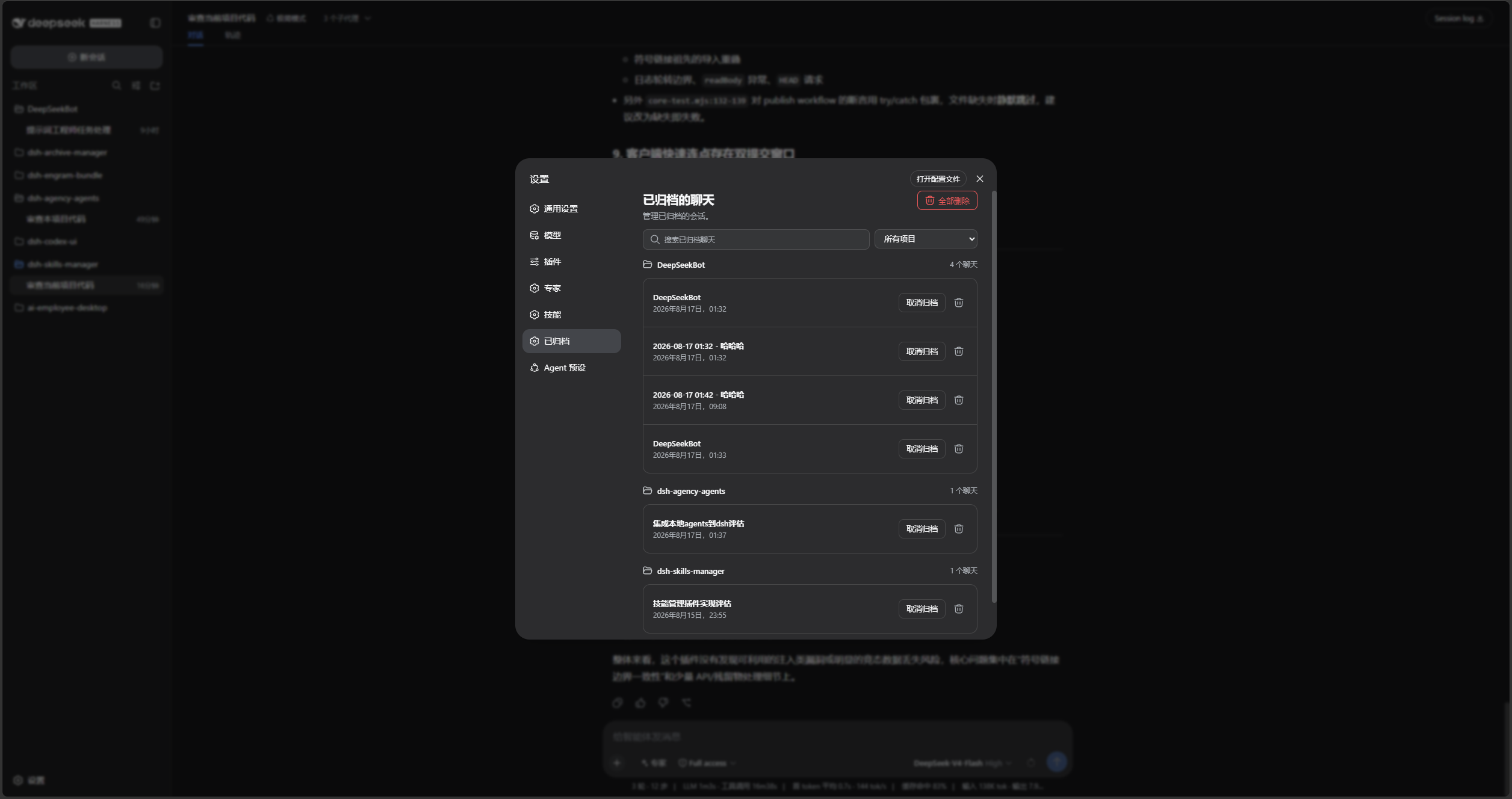
Search, sort, filter by project, unarchive, or permanently delete chats in Settings → Archived sessions:
DSH product ecosystem
For a ready-to-use workbench, download DSH Codex Desktop. If you already use DeepSeek Harness, install any of these eight plugins individually. The desktop app includes all eight.
| Plugin | What you can do |
|---|---|
| Codex UI | Organize projects and conversations, search tasks, and navigate chat turns |
| IM Connect | Send tasks and receive replies through your usual messenger |
| Automation | Schedule tasks and review each run |
| Skills Manager | Find, enable, create, and import local skills |
| Archive Manager | Search, restore, or clean up archived conversations |
| Agency Agents | Choose and summon specialists for your task |
| BTW | Ask side questions without interrupting the main task |
| Simplify | Use /simplify to improve code within your Git changes |
Prerequisites
- Plugin
0.1.33and later support DeepSeek Harness0.1.3-alpha.2(official masterc389f96) alongside the verified legacy hosts listed below. Later master commits require separate validation.
- A working DeepSeek Harness Web installation with
dshavailable in PowerShell. - Examples use the
webprofile; replace it with the target profile. - Source installation and development require Node.js 22+ and pnpm. npm installation does not require running
pnpm installseparately.
Installation
Run pnpm test:compat to test the same plugin artifacts with isolated host dependencies. The following combinations have passed; this does not claim coverage of every intermediate release:
pnpm test: build and run local tests, excludingtest/fixtures; local host links may affect dependency resolution.pnpm test:matrix: build, then install three isolated host versions and run the full matrix.pnpm test:latest: build, then run the six real storage tests against the isolated latest baseline.pnpm test:compat: validate legacy cache migration and run the full matrix.
Do not run test/fixtures/*.mjs directly. Fixtures validate the isolated entry point, dependency versions, and resolved paths before loading the host. If local dependencies have drifted, run pnpm install --frozen-lockfile to restore declared development dependencies. This does not guarantee removal of undeclared packages or host links under test/node_modules; use the isolated commands for compatibility acceptance.
| DSH | Cordis | Automated regression |
|---|---|---|
0.1.1-rc.2 | 4.0.1 | 134 passed, plus legacy cache migration validation |
0.1.2-rc.1 | 4.0.2 | 134 passed |
0.1.3-alpha.2 | 4.0.2 | 137 passed |
Coverage includes client Remote integration, archive/restore, real JSONL/Zstandard deletion and subagent cascades, and queries/reopened storage after deletion. Tested on Windows / Node.js 24; a full DSH Web browser acceptance run has not been performed. The latest storage fixture isolates only the upstream POSIX fs-ext import that cannot load on Windows; file operations and native Windows locking still use the official implementation.
The installation commands below use the official npm registry.
Ask an agent to install it (recommended)
Send the prompt below to any agent that can run terminal commands on your computer. Replace web with your actual profile. Once installed, use the plugin in DSH.
Install the DSH plugin @michengai/dsh-archive-manager into my local web profile by running: dsh plugin --profile web add @michengai/dsh-archive-manager@latest --registry=https://registry.npmjs.org/. Then run dsh --profile web --dump-config, confirm the configuration includes workspace-archive-manager, ui-workspace-archive-manager, and explain how to reload DSH and start using the plugin.Install the latest package from the official npm registry
Run this from any PowerShell directory:
[Console]::OutputEncoding = [System.Text.Encoding]::UTF8
$OutputEncoding = [System.Text.Encoding]::UTF8
dsh plugin --profile web add @michengai/dsh-archive-manager@latest --registry=https://registry.npmjs.org/
dsh --profile web --dump-config
To pin a release, replace @latest with a specific version such as @x.y.z.
The configuration output should contain workspace-archive-manager and ui-workspace-archive-manager. Restart DSH Web and hard-refresh the browser. Do not copy client files manually: the Settings page and archive menu need the mounted plugin.
Updates
The settings title shows the installed version and a Check for updates button. When a newer release is available, Update automatically runs only when the DSH CLI or Desktop update service is available; otherwise, the dialog provides a profile-specific manual command to copy and run.
Usage
- Open the sidebar session menu and choose Archive session.
- Open Settings → Archived sessions to inspect sessions by workspace.
- Search by title, sort by update time, creation time, or title, or filter the list by project.
- Select Unarchive to restore one session, or select Restore all in the page header.
- Open a project heading's action menu to restore or delete all of that project's archived chats.
- Use the delete icon to remove one session permanently, then confirm the deletion. It cannot be undone.
If the entry is missing after installation or upgrade, restart DSH Web and hard-refresh the browser. It is located directly after Connectors in Settings.
Data handling limits
- Deletion always requires confirmation.
- It removes workspace records, archive markers, and the projection cache. For the official JSONL backend, a validated layout also allows removal of the session-owned directory and its contents, including attachments. Other backends or unknown layouts only lose the located transcript artifact, never its parent directory.
- Project containers and storage roots are retained. Deletion refuses symbolic links or Windows junctions at the official layout's project/session directory levels and keeps the operation retryable.
- Layout validation uses the official backend's initialized absolute root, so a relative root remains stable across host working-directory changes. If that field is unavailable, only an absolute configured root is accepted. An unverified official JSONL layout emits a warning with the session ID and artifact path before falling back to artifact-only deletion.
- Directory validation is not a cross-process filesystem lock: do not concurrently move or replace storage directories or change directory links during deletion. Storage paths writable by untrusted processes are not a security isolation boundary.
- A live session finishes writing before cleanup to prevent data truncation.
- The plugin replaces DSH’s default workspace and projection services. Install through the DSH profile instead of manually composing the patch.
Secondary development
Install from source
Use this for debugging or unpublished changes. The cloned directory becomes the plugin source path:
[Console]::OutputEncoding = [System.Text.Encoding]::UTF8
$OutputEncoding = [System.Text.Encoding]::UTF8
Set-Location D:\Repository\deepseek-harness-plugin
git clone https://github.com/MichengAI/dsh-archive-manager.git
Set-Location .\dsh-archive-manager
pnpm install --frozen-lockfile
pnpm build
dsh plugin --profile web add .
dsh --profile web --dump-config
Restart DSH Web and hard-refresh the browser. dsh plugin ... add . reads the package metadata and cordis.patch.yml; do not install by copying lib directly.
src is the sole maintained source directory. pnpm build uses esbuild to compile it into publishable lib output. Do not edit lib directly because the next build overwrites it.
- src\index.js: host service entry point.
- src\workspace.js: archived-session and workspace service.
- src\projcache.js: session projection cache.
- src\client.js: Settings page and archive UI.
test\*.test.mjs: host, client, Remote, and styling coverage.
After changing src, run the tests, confirm that generated lib output is committed with the source, then install from the local directory:
[Console]::OutputEncoding = [System.Text.Encoding]::UTF8
$OutputEncoding = [System.Text.Encoding]::UTF8
pnpm test
pnpm pack:check
dsh plugin --profile web add .
pnpm test runs pnpm build first. The build generates all lib output from src in a temporary directory, then atomically replaces the previous output only after a successful build. A failed build preserves the existing lib.
Validation
[Console]::OutputEncoding = [System.Text.Encoding]::UTF8
$OutputEncoding = [System.Text.Encoding]::UTF8
pnpm verify
prepublishOnly runs the full verification suite before publishing and verifies that committed lib output matches the current src build.
License
Licensed under Apache License 2.0.
