

dsh-agent-plugins-market
A plugin marketplace and agent capability workspace for DeepSeek Harness (DSH).
Reuse supported content from Claude Code, Codex, Cursor, Kimi and other recognized layouts. Manage your own skills, commands, agent personas, MCP services and LSP servers in the DSH Web GUI. Supported layouts are read in place, without converting manifests or manually copying files into DSH. See the capability matrix for format-specific limits.
English | 简体中文 | Documentation | npm


Quick start · Everyday use · Compatibility · FAQ
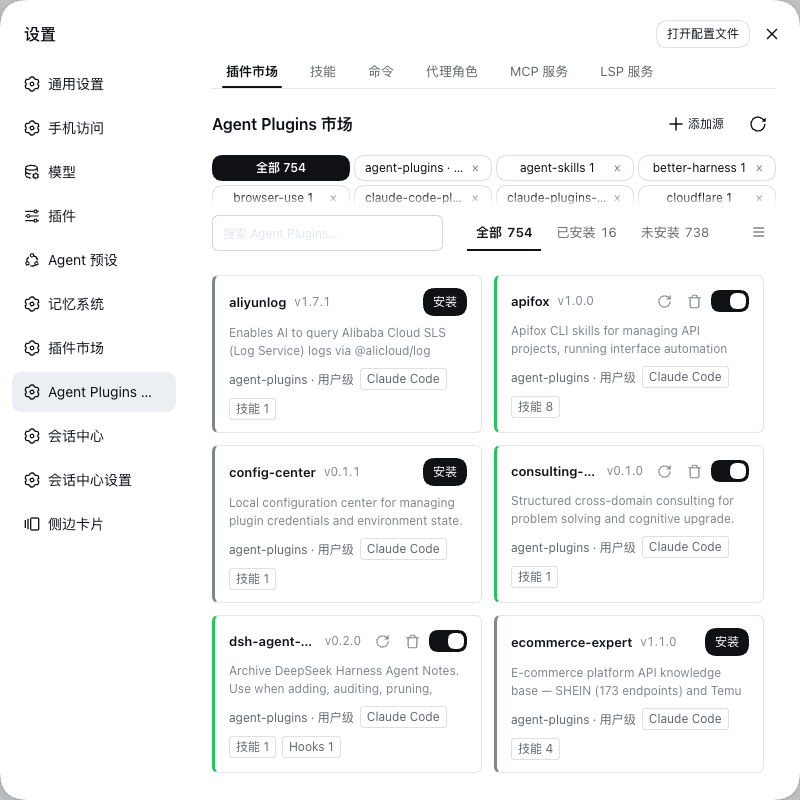
What you can do
- Reuse ecosystem suites. Add a Git repository, local directory or archive as a source; browse, preview, install and enable its suites. Supported capabilities become available to DSH at runtime.
- Build your own toolkit. Create skills, reusable slash commands and agent personas. Edit or disable your own entries without deleting them.
- Keep project resources in place. Project
.claude/and.agents/skills and agents are discovered without an installation step or file copying. - Manage services where you use them. Add your own MCP services and LSP servers, configure credentials and authorization for installed ones, inspect status, and diagnose unavailable services from one workspace.
Quick start
You need Node.js 22+, Git for Git sources, and a DSH Web profile with the skill service enabled. This repository declares DSH peer packages in the ^0.1.2-rc.1 range; individual capabilities also depend on the services in your profile. See host requirements.
Install into your profile, replacing <name> with its name:
dsh plugin --profile <name> add dsh-agent-plugins-market- Restart DSH and open Settings → Agent Plugins Market. Older shells may show a top-level page entry instead.
- In Market, add a source, for example
https://github.com/anthropics/claude-plugins-official. No sources are preconfigured. - Open a suite, review its contents, then install it and ensure it is enabled.
- For a suite with skills, check the Skills tab and type
/in chat to find its user-invocable skills. For an MCP suite, check MCP services and resolve any credential or connection notices before using its tools.
For GitHub installation and profile configuration, see the usage guide.
Everyday use
MCP details separate Retry connection (keeps credentials) from confirmed OAuth reauthorization. There is no enable switch in the detail dialog.
The workspace has six tabs:
| Tab | Use it to |
|---|---|
| Market | Add sources, preview suites, install / uninstall, enable / disable and refresh. |
| Skills | Browse skills and create or edit your own reusable instructions. |
| Commands | Manage prompt templates invoked as /name; $ARGUMENTS inserts the text supplied after the command. |
| Agent personas | Select providers, models and reasoning effort from DSH, manage role instructions and tools, and delegate through subagents_run. |
| MCP services | Add a service or configure an installed one, its credentials and authorization; inspect status and retry failures. |
| LSP servers | Add and configure language servers and inspect their runtime status. |
A source is where content comes from; a suite is an installable unit discovered there. Adding a source discovers its suites. Installing and enabling a suite controls its runtime capabilities. Suite details preview files; MCP credentials and overrides are edited in MCP services.
Your own skills, commands and personas are stored as Markdown under ~/.dsh/agent-plugins/user/. Project-native resources stay in the project. See storage and discovery for paths and precedence.
All six tabs share a saved grid/list preference. Add and refresh actions sit at the top right; resource state rails are green when active.
Resource details share a wide dialog. Markdown resources open with rendered content and structured frontmatter; switch to Markdown to edit. MCP/LSP provide fixed forms and JSON editing over the same configuration.
Services you add yourself are validated before saving, persist under ~/.dsh/agent-plugins/data/, and mount through the same lifecycle as suite services. Services observed from the host configuration stay read-only.
Asynchronous workspace actions show a blocking overlay on the active settings panel or detail dialog, with rotating waiting messages. The overlay is released on success or failure; background status polling stays silent.
Compatibility and boundaries
Supported layout dialects describe how files are organized. The shared priority table lists suite manifests and Marketplace catalogs together.
All ten active layout contracts in schemas/ have independent reader tests. The layout audit maps them to commit-pinned README repository fixtures and distinguishes layout/component compatibility from full original-client runtime equivalence.
Supported runtime surfaces describe what DSH can use:
| Surface | Runtime support and conditions |
|---|---|
| Skills | Host skill catalog and user-invocable slash entries; supported root placeholders are expanded. |
| Commands | Slash commands through the host command service. |
| Agents | Dynamic subagent catalog and subagents_run; requires host agents, tools, LLM and subagent services. |
| MCP | Built-in bridge by default: stdio, Streamable HTTP with OAuth, and legacy SSE. Optional host-client compatibility mode is also available. |
| Hooks | The command-hook subset mapped by dsh-hooks-claude-code. |
| LSP | Live mounts when the host provides LSP packages; the profile must expose the LSP tool for agent use. |
Agent roles are published directly in a dynamic subagent-catalog, using the same per-step comparison, durable entries and complete replacement mechanism as DSH's skills catalog. Call subagents_run(role, prompt) with the catalog's exact ID; it resolves the role's provider, model and reasoning_effort, then applies the persona and tool restrictions. Roles no longer generate agent-* or persona-* skill/command entries. See agent roles for model inheritance, catalog refresh and migration from market_agent.
Layout detection precedence
When multiple manifests exist in the same suite directory, the first existing file in this order selects the layout:
| Priority | Layout | Suite manifest | Marketplace catalog |
|---|---|---|---|
| 1 | agent-plugins.org v1 / root compatibility | plugin.json | No dedicated catalog |
| 2 | Universal compatibility | .plugin/plugin.json | .plugin/marketplace.json |
| 3 | Claude Code | .claude-plugin/plugin.json | .claude-plugin/marketplace.json |
| 4 | Cursor | .cursor-plugin/plugin.json | .cursor-plugin/marketplace.json |
| 5 | Kimi Code | kimi.plugin.json, then .kimi-plugin/plugin.json | .kimi-plugin/marketplace.json |
| 6 | Codex | .codex-plugin/plugin.json | .agents/plugins/marketplace.json, then .agents/plugins/api_marketplace.json |
| 7 | ZCode | .zcode-plugin/plugin.json | No dedicated catalog |
| 8 | Qoder CLI | .qoder-plugin/plugin.json | .qoder-plugin/marketplace.json |
| 9 | GitHub Copilot CLI | .github/plugin/plugin.json | .github/plugin/marketplace.json |
| Fallback | Skill collection / shared catalog | Discover skills when no recognized manifest exists | Root marketplace.json |
- Selection precedes parsing: an invalid higher-priority manifest produces diagnostics; it does not trigger a retry with a lower-priority manifest.
- Root manifest identity: root
plugin.jsonuses strict v1 validation only when it declares a recognized agent-plugins.org$schema. Otherwise it is read as a Claude-compatible manifest. - Component fallback: manifests are not generally merged. For a non-v1 root
plugin.json, missing component declarations can come from.claude-plugin/plugin.json. Explicit root declarations win; marketplace entry declarations fill remaining gaps.
Both columns follow the same layout priority. Catalog lookup skips layouts without a dedicated catalog; aliases are tried in the listed order. Root marketplace.json is a shared fallback, not a skill-collection manifest or an agent-plugins.org v1 catalog, and does not inherit the priority of root plugin.json.
All existing catalogs are read, but suite scanning selects the first catalog that produces suites, rather than merging every catalog. Invalid or empty catalogs allow the next candidate to be tried. This priority does not make native project directories mutually exclusive.
The order is defined in src/model/layouts.ts; selection and root-manifest fallback are implemented in src/catalog/manifests.ts.
Layout capability matrix
Checked against official documentation, this plugin's source, and one real repository per schema on 2026-09-08. This table describes integration by this plugin. “Shared” means the plugin's common scanning conventions, not an upstream-defined capability. “Partial” requires the limitations below. The compatibility report records the sampled repositories, their commits, the schema verdicts and the scanner output.
| Layout | Skills | Agents | Commands | MCP | Hooks | LSP |
|---|---|---|---|---|---|---|
| Claude Code | Declared + default skills | Declared Markdown | Declared Markdown | Files / inline | Command-hook subset | Files / inline |
| Codex | Supported | Shared | Shared | Partial: .mcp.json | Compatible event subset | Shared inline |
| Cursor | Supported | Partial: .md only | Partial: .md only | Partial: see below | Native events unsupported | Shared inline |
| Kimi Code | Declared skills + startup | Declared Markdown | Declared commands | Inline | Inline command events | Shared extension, non-native |
ZCode .zcode-plugin/ | Shared | Shared | Shared | .mcp.json + inline overrides | Shared | Shared inline, non-native |
Qoder CLI .qoder-plugin/ | Shared | Shared | Shared | Partial: prefers .mcp.json | Shared | Shared inline, non-native |
| GitHub Copilot CLI | Declared skills | .md / .agent.md | Declared Markdown | Files / inline | Mapped command events | Files / inline |
Universal compatibility layout .plugin/ | Shared | Shared | Shared | Shared | Claude-format subset | Shared inline |
| agent-plugins.org v1 | Supported | Shared, nonstandard | Shared, nonstandard | Standard mcp.json | Shared, nonstandard | Directory preview only, nonstandard |
| Manifest-less skill collection | Supported | Shared | Shared | Shared files | Claude-format subset | Directory preview only |
| Project-native directories (see below) | Supported | Portable Markdown roles | Scoped commands | JSON / Codex TOML | Mapped command-hook subset | Diagnosed, not mounted |
- Component paths: declared files, directory trees and arrays resolve inside the suite by realpath. Commands, agents and detail panels use the same resources. Cursor also accepts
.mdc,.markdownand.txtcommands; Qoder maps support files and inline content. Claude/Codex skills supplement default discovery. Flat skill Markdown files work in manifest-less collections. - Agent identities:
reviewer.agent.mdandreviewer.mdretain distinct role IDs in the subagent catalog. Roles have no generatedagent-*skill or command aliases. Ordinary skills with those names remain skills. - MCP: declared files, inline maps and arrays are resolved by dialect. Cursor's schema-less
mcp.jsonis supported; agent-plugins v1 stays schema-strict. Claude/ZCode declarations add to defaults, Cursor declarations replace defaults, Copilot/Universal include.github/mcp.json, and Kimi Code uses inline declarations. Invalid explicit configs cannot revive defaults. Codex app connectors remain outside this adapter. - Hooks: declared files/directories and inline configs are supported, including Kimi arrays and ZCode process hooks with quoted argv. Supported Copilot/Cursor lifecycle names map to the existing command-hook bridge. Events without a DSH equivalent, such as
afterFileEdit, are diagnosed rather than simulated. - LSP: user suites accept declared files, arrays and inline tables, plus
.lsp.jsonand Copilot/Universallsp.json,.github/lsp.json,lsp-config/servers.json. Reverse-domain directory definitions remain previews. Project LSP retains its host-scope limitation. - Specification boundaries: agent-plugins.org v1 standardizes portable skills and MCP only; shared agents / commands / hooks scanning is not a standard capability. Universal is a compatibility-layout label used by this plugin; the OpenHands SDK documents the same
.plugin/plugin.jsonlocation and a Vercel repository uses it, but no cross-vendor specification exists. - Kimi Code: the active schema covers both manifest spellings, startup skills, appended skill instructions, system prompts, inline hooks and catalog aliases. The historical
kimi-cliroot tools protocol is a different system; it must not be confused with the current Kimi Code schema. - ZCode boundary:
.zcode-plugin/plugin.jsonand rootmarketplace.jsonare recognized, including keyed plugin maps. Inline MCP servers override matching.mcp.jsonkeys. The zip +sha256marketplace distribution contract is not implemented. - Qoder boundary:
.qoder-plugin/plugin.jsonand.qoder-plugin/marketplace.jsonare recognized. MCP prefers.mcp.json, with schema-lessmcp.jsonas fallback. - GitHub Copilot CLI:
.plugin/plugin.jsonretains the Universal identity. Both spellings consume declared component paths and fallback MCP/LSP files. Isolated tests suppress competing manifests at nested suite roots, preventing a Claude fallback from masquerading as a passing Copilot test. - Project directories: Claude project skills and Codex
.agents/skillsare documented upstream;.agents/agentsand.agents/commandsare this plugin's shared discovery conventions.
Project layout switch
The plugin settings card exposes Scan project Agent layouts (dsh-agent-plugins-market.scanProjectLayouts, default true). Turning it off removes this plugin's native project candidates immediately; configured sources and the harness's own skill providers remain independent. Files are read in place and are never installed, rewritten or deleted.
The registry reads skills under .claude, .agents, .codex, .cursor, .kimi, .zcode, .qoder and .github. Portable Markdown agents are enabled for all except .codex and .kimi; their TOML/YAML formats need separate adapters. Role execution resolves the calling session's project. Project commands, supported MCP servers and mapped command hooks register in each agent's scoped context and refresh on session startup or catalog changes; disabling the switch removes them.
MCP reads root .mcp.json, .cursor/mcp.json, and the mcpServers tables in .qoder/settings.json and .qoder/settings.local.json (local keys override project keys). ZCode reads mcp.servers from zcode.json and .zcode/config.json, with .agents/mcp.json as an empty-native-table fallback. Codex reads [mcp_servers.*] from .codex/config.toml through smol-toml, preserving stdio/HTTP configuration, environment/header references, enabled flags, tool filters and timeouts. Unsupported server options produce diagnostics; host-client mode rejects policies it cannot enforce. Relative executables resolve from the project root. Claude/Qoder settings hooks and enabled ZCode configuration hooks use the bridge's supported command-event subset. Validated hooks become private temporary runtime files removed on teardown; project files remain unchanged. Project LSP is diagnosed and not mounted: host changes are outside this plugin's scope. See the architecture decision and supported boundaries.
Verified samples
The nine README repository samples have offline snapshots in tests/fixtures/real-layouts/, with commit IDs, hashes and licenses. Tests validate real schemas, scan original trees and isolate each dialect independently. The compatibility report records natural precedence; the audit records independent resource checks.
| Layout | Sample repository | Dialect manifest | Schema | Scanner |
|---|---|---|---|---|
| Claude Code | grafana/mcp-grafana | .claude-plugin/plugin.json | valid | integrated |
| Codex | saadeghi/daisyui | .codex-plugin/plugin.json | valid | shadowed |
| Cursor | EveryInc/compound-engineering-plugin | .cursor-plugin/plugin.json + marketplace | valid | shadowed |
| Kimi | obra/superpowers | .kimi-plugin/plugin.json | valid | shadowed |
| Universal | muratcankoylan/Agent-Skills-for-Context-Engineering | .plugin/plugin.json | valid | integrated |
| agent-plugins.org v1 | saadeghi/daisyui | plugin.json | valid | integrated |
| ZCode | zenstory-ai/oh-story-claudecode | .zcode-plugin/plugin.json + marketplace.json | valid | shadowed |
| Qoder CLI | DietrichGebert/ponytail | .qoder-plugin/plugin.json | valid | shadowed |
| GitHub Copilot CLI | headroomlabs-ai/headroom | .github/plugin/marketplace.json | valid | shadowed |
Scanner describes the unmodified repository: integrated means its own manifest won; shadowed means another won; unread means no suite. These verdicts are separate from passing isolated tests. Skill collection is tested with the real Universal repository's skills and no manifests, completing coverage of all ten layouts.
Source checks covered src/catalog/manifests.ts, surfaces.ts, validate.ts, native-project.ts, and src/runtime/hooks-mounts.ts. The compatibility report adds one real repository per schema, read by this plugin's own scanner. This is a documentation, source and sample audit, not end-to-end compatibility certification for every platform.
Reading a layout does not guarantee every behavior of its original platform. Invalid declarations are diagnosed and skipped. Project-native commands and supported MCP servers use agent-scoped host registration; project MCP server names include session identity to avoid app-wide namespace conflicts.
Review third-party suites before enabling them: enabled services and hooks can execute programs. See the runtime and security details.
FAQ
Why is an installed skill or tool missing?
Check that the suite and the relevant capability are enabled. Skills may restrict manual invocation. MCP / LSP panels show user-service failures. Project resources additionally require the project-scan switch; unsupported native fields and project LSP declarations appear in scan diagnostics, while scoped mount failures are logged by the host.
Where do I configure MCP tokens?
Open the service in MCP services. Missing environment references show needs-credentials. Host-managed credentials are write-only; launch-environment credentials require changing the environment and restarting DSH.
How do I add a service that no suite declares?
Use Add in MCP services or LSP servers. The declaration is validated, stored under ~/.dsh/agent-plugins/data/, and mounted through the same lifecycle as suite services. Host-observed services remain read-only.
What if a source download fails?
Use a local directory, adopt a manual checkout, or configure a proxy / mirror. See source configuration.
When do local edits become visible?
There is no file watcher. Local-source discovery caches results for up to 30 seconds; refresh the source to invalidate them immediately. Project discovery has a separate five-second cache. A refresh does not happen automatically on an already-open page.
Does removing a source delete its files?
Only when you tick also delete the managed market directory in the confirmation. That removes the source's checkout under ~/.dsh/agent-plugins/.sources/<id> — including one you cloned yourself and adopted. A local-directory source pointing outside .sources/ is never deleted.
More documentation
- Usage guide: installation, source configuration, storage, host requirements, MCP / LSP and feedback settings.
- Plugin specifications: per-dialect reference schemas and evidence, plus the vendored agent-plugins.org v1.0.0 contracts.
- Compatibility report: one real repository per schema, with commits, schema verdicts and scanner output.
- Contributing: development setup, checks and PR workflow.
- Security policy · Release history · MIT license.
- Domain glossary · Architecture.
See agent roles and storage for installed-resource editing, model routing and migration.
