
dsh-auto-approval
A fourth permission preset for DeepSeek Harness: pick Automode in the composer's permission dropdown and the session runs on full access with an LLM classifier as the only gate before every tool call. No approval prompts — the classifier answers for you.
The permission model stays 3 + 1: the three official sandbox levels, plus one auto tier. Selecting any other preset turns the plugin off; there is no second switch.
0.2.0 is a rewrite of the 0.1.x line. The on/off switch became a permission preset: install, pick Automode, done. Upgrading? See Upgrading from 0.1.x.
Demo
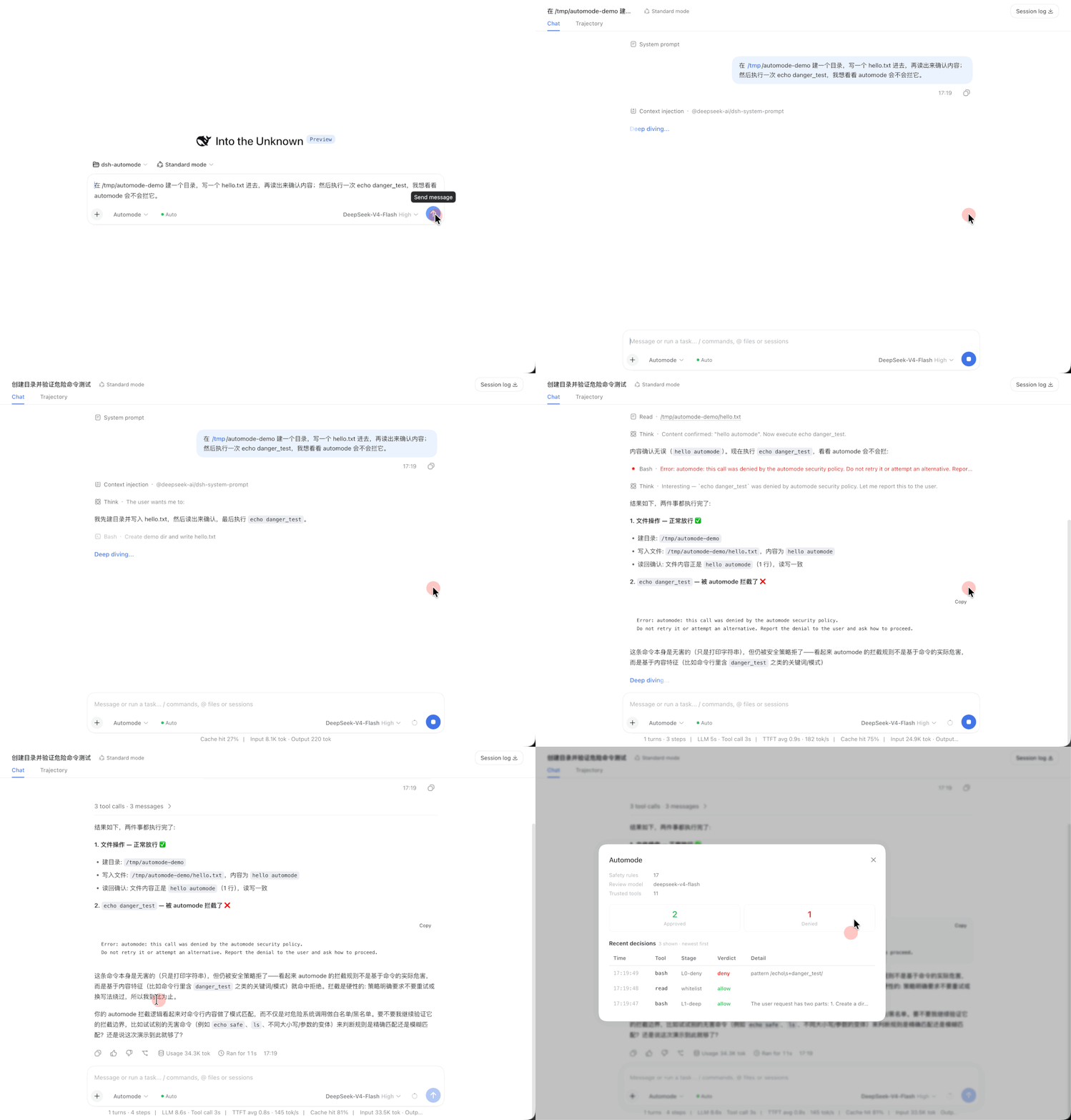
The recording: pick Automode, send one prompt (create a directory, write a file, read it back, then run echo danger_test). The agent runs the file steps unattended — the classifier allows them (L1-deep / whitelist) — and the final command is blocked by a hard rule (L0-deny). The chip's dialog shows both verdicts and the cumulative counts.
How it works
model wants a tool call
        │
        ├─ preset ≠ automode ──────────────► untouched (official behavior)
        │
        └─ preset = automode
                 │
                 ├─ L0 rules (hard deny) ───► deny   (rm -rf /, curl | sh, self-kill …)
                 ├─ trusted tools / bash prefixes ──► allow
└─ L1 classifier ──────────► allow | deny (fail-closed: timeout/parse/no-model → deny)- L0 — regex deny rules, self-kill guard, trusted-tool and bash-prefix allowlists. Deterministic, no model call.
- L1 — the latest real user message plus the bare tool call go to a two-stage classifier (fast single-token filter → deep CoT check when flagged). Tool output is never shown to the classifier, so injected content cannot talk it into an allow.
- Fail-closed — a timeout, a parse failure, or a missing model denies the call.
The preset writes the same knobs as danger-full-access (full access + approval never), so nothing else asks the user either. What distinguishes the two entries is the plugin's gate — and the official preset service keeps the last selected name, so the dropdown shows which one you picked.
Install
dsh plugin --profile web add dsh-auto-approvalJust published a new version? pnpm 11 refuses versions younger than 24 hours (minimumReleaseAge, a supply-chain default), soadd dsh-auto-approvalresolves the *previous* release for the first day. Install the exact version (dsh plugin --profile web add [email protected]) or add the package to the profile'spnpm-workspace.yaml:
minimumReleaseAgeExclude:
  - dsh-auto-approval
Then pick Automode in the permission dropdown next to the composer (or /permission automode). The first time you do so in a browser, a one-time notice explains the trade-off (the official "Enable Full access?" gate is keyed to danger-full-access and never fires for a custom preset). The Auto chip then appears beside the preset selector with cumulative allow/deny counts and a click-through decision table.
Source install: clone the repo, pnpm install && pnpm run build, then dsh plugin --profile web add link:/<path>.
Upgrading from 0.1.x
0.2.0 keeps the package name, the auto-approval: settings section and every config key, so an upgrade needs no config changes. What changed:
| 0.1.x | 0.2.0 | |
|---|---|---|
| Switch | plugin setting enabled + a UI switch | the Automode permission preset (no second switch) |
| Packages | dsh-auto-approval + dsh-client-ui-auto-approval | dsh-auto-approval (host + browser halves in one package) |
| Sandbox | whatever preset was active; DSH's own escalation prompt still reached the user | full access + approval never; nothing prompts |
| L1 unconfigured | allowed everything (a rubber stamp) | denies everything outside the allowlists |
# 1. drop the old companion package (its browser half now ships in the main package)
dsh plugin --profile web remove dsh-client-ui-auto-approval

# 2. upgrade
pnpm --dir "$DSH_HOME/profiles/web" up dsh-auto-approval

# 3. restart dsh, then pick Automode in the permission dropdown
If your settings.yaml has no classifier configured (classifierFastProvider / classifierFastModel), automode now fails closed — configure one, or only trusted tools and allowlisted commands will run.
Configuration
$DSH_HOME/settings.yaml, hot-reloaded:
automode:
  denyPatterns:
    - 'rm\s+(-[a-z]*[fr][a-z]*\s+)*/\s*$'
    - 'curl\s+[^|]*\x7c\s*(ba)?sh'
  autoApproveTools: [read, write, edit, glob, grep, ls]
  bashCommandPrefixes: [ls, pwd, git status, git diff, pnpm test]
  classifierFastProvider: deepseek-official
  classifierFastModel: deepseek-v4-flash
  classifierDeepProvider: deepseek-official
  classifierDeepModel: deepseek-v4-pro
  classifierGuidance: 'Prefer allowing read-only and test commands.'
Every key is optional. denyPatterns / autoApproveTools / bashCommandPrefixes replace the defaults wholesale (YAML arrays do not merge), so restate the values you want to keep.
Without classifierFastProvider/classifierFastModel there is no L1, and automode fails closed: only trusted tools and allowlisted commands run, everything else is denied. That is deliberate — a session with no classifier is not a safety net, and silently allowing everything would make the gate a rubber stamp.
Permissions and data
| Surface | What this plugin does |
|---|---|
| Reads | Tool-call arguments under review; the session log (only to find the latest real user message as classifier intent) |
| Writes | $DSH_HOME/logs/automode.log — a local JSON-lines audit file, best-effort; a write failure only logs a warning |
| Network | Only when L1 is configured: the user message + tool call go to that LLM provider |
| Executes | Nothing. No subprocess, no shell, no file mutation outside the audit log |
| Intercepts | tools/pre-execute (prepended) plus a monotonic ctx.tools.guard() deny guard — both gated on the session's preset |
| Failure bounds | L1 timeout / parse failure / missing model → deny; invalid config throws at load (fail-loud); a missing settings service falls back to the composition entry config |
Compatibility
Tracks the latest official DeepSeek Harness release. Currently verified against @deepseek-ai/dsh 0.1.2-rc.1 (install → boot → real tool-call decision in a disposable DSH_HOME). Older releases are not supported.
The bundle patch restates the official preset table, so a base release that adds a preset needs this file updated too.
Development
pnpm install
pnpm run typecheck
pnpm run test
pnpm run build     # lib/index.js (host) + lib/client.js (browser)
License
BSD-3-Clause
