
dsh-office-tools
Eight model-facing Office file tools for DeepSeek Harness, running entirely in the plugin host half.


Install: dsh plugin --profile web add github:kw78/dsh-office-toolsDSH Store lists a fixed Commit; verify the installed source against it:ae1ddd40f98debf4b1430748d287951f35faaf36(tagv1.0.0). Later commits onmaincarry test/doc additions only unless the version bumps.
Eight model-facing Office file tools for DeepSeek Harness, running entirely in the plugin host half — dependency-free since 1.0.0: every package is generated and parsed by this plugin's own OOXML engine, and every byte crosses the official DSH filesystem service (ctx.fs), never the raw file system.
| Tool | Purpose |
|---|---|
word_create | Create .docx (title, paragraphs, bullets, one table) |
word_read | Extract text from any .docx; format: "markdown" renders headings, lists, and tables structurally |
word_update | Append paragraphs, bullets, and/or a table to an existing .docx |
excel_create | Create a multi-sheet .xlsx from scalar cell grids |
excel_read | Read one or all sheets as scalar rows; formulas return cached values or '=…' strings |
excel_update | Replace/create whole sheets, or write cells by A1 address |
ppt_create | Create a 16:9 .pptx (title slide, titles, paragraphs, bullets, notes, linked PNG/JPG/GIF images) and echo every element's landing position |
ppt_read | Extract per-slide paragraphs, tables, speaker notes, image counts, alt texts — plus every shape's bounding box in inches and a text wireframe sketch |
String cells starting with = are written as real Excel formulas (Excel computes them on open).
Demo
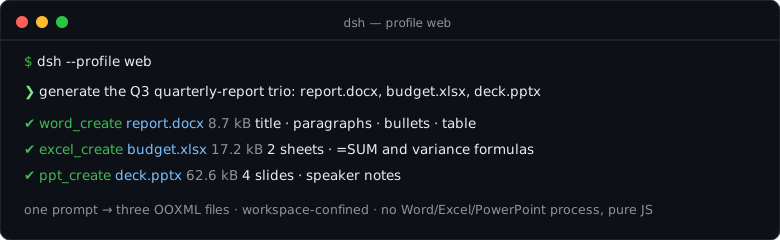
One prompt, a quarterly-report trio — Word with a metrics table, Excel with =SUM/variance formulas, PowerPoint with speaker notes:
The prompt behind that session:
Generate the Q3 quarterly-report trio:report.docx(title, two summary paragraphs, three highlights, a metrics table),budget.xlsx(a Budget sheet with=SUMtotals and plan-vs-actual variance formulas, plus a Summary sheet), anddeck.pptx(title slide + three content slides with speaker notes).
The model turns it into word_create → excel_create → ppt_create (reads come back through word_read / excel_read / ppt_read; freshly written formulas read back as '=…' strings until Excel caches values). The whole flow is pinned by tests/demo-trio.spec.ts, so the demo cannot drift from the tools. The file sizes in the image come from a real run of that test scenario.
Harness integration
The plugin follows the standard DSH host-plugin contract:
- It exports
name/inject/apply/Config;inject = ['tools', 'fs']— the official tool registry and the official filesystem service (@deepseek-ai/dsh-tools,@deepseek-ai/dsh-fs) are its only runtime service dependencies. apply(ctx)wraps everyctx.tools.register(defineTool({...}))inctx.effect(...)so Cordis disposes the registrations with the plugin fiber.defineTooldeclares model-visibleparameters, a validated canonicaloutput.schema, and a pureoutput.rendertext projection.execute(args, exec)resolves every path againstexec.agent.session.header.cwd; relative paths stay in the session workspace and absolute paths are accepted only when still inside it. Containment and symlink resolution are enforced by thectx.fsbackend (plus a lexical pre-check here).- All reads arrive as raw bytes via
ctx.fs.readBytes; all writes leave as UTF-8 text viactx.fs.writeText— published atomically by the backend;overwritedefaults tofalse. - Generated packages are pure ASCII by construction (an ASCII-safe STORE zip planner pads each XML part and aligns offsets so every CRC/size/offset field stays byte-safe), which is exactly what lets real
.docx/.xlsx/.pptxfiles travel through the text channel byte-identically. Non-ASCII text encodes as XML character references; every Office suite opens the result. - Reads accept any real-world package (STORE and DEFLATE entries, bounded by the zip-bomb guard).
word_update/excel_updatere-publish through the text channel, so they work on packages whose every part is text (always true for files these tools write, and for OOXML packages without binary media); packages carrying binary media are refused with a clear error instead of being corrupted.- Images are LINKED, not embedded: the model controls placement fully (
x/y/w/hinches,contain/covercropping, alt text; PNG/JPG/GIF headers are sniffed so omitted dimensions default to natural size), and the deck references the workspace image file. Keep the image files next to the deck when moving it — that is the trade-off of a dependency-free, binary-free package. ppt_createechoes the full layout (every element's box in inches + the canvas size + a text wireframe sketch per slide);ppt_readreturns the same geometry for any deck, so the model can see and re-author compositions.
Build
pnpm install
pnpm run check   # typecheck + tests + build
Artifacts: lib/index.js (ESM host bundle of this plugin's own code only — ~116 kB, zero runtime dependencies) and lib/types/**/*.d.ts. Every @deepseek-ai/* package (cordis, the dsh services, schemastery) stays external and is provided by the profile's node_modules.
Install
# npm (recommended)
dsh plugin --profile web add dsh-office-tools

# GitHub source
dsh plugin --profile web add github:kw78/dsh-office-tools

# local checkout
dsh plugin --profile web add /path/to/dsh-office-tools
Restart the DSH server after installation. The eight tools appear in the next prompt assembly. Since 1.0.0 the plugin has zero runtime dependencies — no npm fetch, no CDN, no postinstall scripts; installation is the committed source, nothing else. The host must provide the fs service (every DSH profile that ships the built-in read/write tools does).
Configuration
The plugin declares a schemastery Config the Loader validates at load time. One option exists today:
| Option | Type | Default | Effect |
|---|---|---|---|
enablePptTools | boolean | true | Register ppt_create / ppt_read. Set to false to load this plugin for Word/Excel only. |
enablePptTools: false exists for coexistence: dedicated presentation plugins such as dsh-ppt also register a ppt_create, and DSH refuses duplicate tool names at startup (tool "ppt_create" is already registered). Disable the PPT pair here and let the dedicated plugin own presentations:
# profile cordis.patch.yml
- insert:
    - id: dsh-office-tools
      config:
        enablePptTools: false
Community indexes
- Registration blocks for awesome-dsh-plugin / dsh-market are in docs/hub-registration.md.
- Recommended repository topics:
dsh,dsh-plugin,deepseek-harness,office.
Safety
- All file access is confined to the calling agent's session workspace.
- Reads are capped at 50 MiB compressed; before anything is inflated, the archive's own declared sizes are checked against budgets (256 MiB per entry, 512 MiB per archive, 100 000 entries), so zip bombs are refused rather than decompressed. XML parts carrying DOCTYPE/ENTITY declarations are refused outright.
- Text/cell results are bounded and mark
truncated. - Creates/updates are bounded by row and cell limits and refuse overwrites by default.
- No LibreOffice/PowerPoint/Word subprocess is spawned and no third-party library is shipped: formats are generated and parsed by this plugin's own ASCII-safe OOXML engine over
node:zlib. - The plugin's own code never touches the file system directly — there is no
node:fsimport anywhere insrc/; every byte flows through the official, user-visiblectx.fsservice. This is what lets third-party store automation verify the whole runtime source deterministically (DSH Store issue #334: 1.0.0 passes the complete automatic low-risk policy — zero runtime dependencies, zero file/network/commands/credentials signals, bounded source, exact per-release compatibility declarations). - Roadmap: docs/ROADMAP.md.
