
dsh-session-categories
English | 中文
Session Categories adds user-managed category trees to the dsh sidebar. Each Workspace keeps its own categories, and each session can belong to at most one category.
The package includes the Host entry, Web client bundle, and Cordis profile patch. No separate Client or Bundle package is required.
What it looks like
The sidebar groups sessions inside clear, collapsible category containers. The screenshot shows the Workspace, category, and session hierarchy in the current plugin layout.
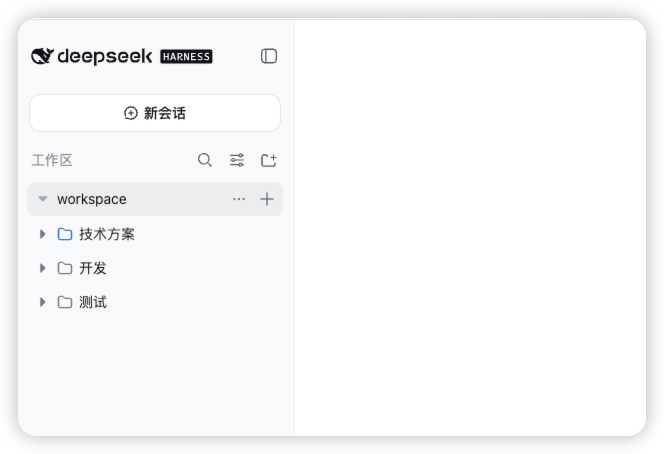
Within a Workspace, you can:
- create a session directly inside a category;
- expand or collapse categories without losing their hierarchy;
- drag a session into another category;
- create a top-level category from the Workspace actions menu;
- create a child category, or rename and delete the current category, from the category actions menu;
- move a session with the folder icon on the Move to category action.
Expanded categories use nested containers with a fixed inset at each depth. Sessions receive one additional inset beyond their category, and drag targets highlight without changing row dimensions. Collapsed Workspace rows show a hierarchy icon when they contain categories or sessions.
Install from GitHub
The dsh command must be available in your shell. Install the prebuilt package directly into an unmodified dsh Web profile:
dsh plugin --profile web add dsh-session-categories
dsh --profile web
If you are running dsh from a source checkout, use its package launcher instead:
pnpm dsh plugin --profile web add dsh-session-categories
pnpm dsh --profile web
The repository includes generated runtime files, so a separate plugin build is not required.
For the unreleased GitHub version, install directly from the repository:
dsh plugin --profile web add github:ht719/dsh-session-categoriesBehavior and data
Deleting a category recursively archives its sessions; it never deletes their durable logs. Archive operations are retried with the same operation id and recover after a restart. Mutations reject stale revisions, cross-Workspace session ids, descendant moves, and assignments to unknown categories.
Compatibility
The plugin targets the current dsh prerelease plugin APIs and is intended to work with an unmodified dsh installation. dsh does not promise pre-release compatibility across versions, so update dsh and this plugin together when upgrading.
Source layout
The repository root is the installable prebuilt package. Source packages are retained under packages/workspace/session-categories/, packages/client/ui-session-categories/, and packages/bundle/session-categories/.
The plugin is composed as an ordinary Cordis row. It does not require changes to ui-workspace, ui-slots, api-remotes, or other core dsh packages.
