
@kelearns/dsh-token-usage



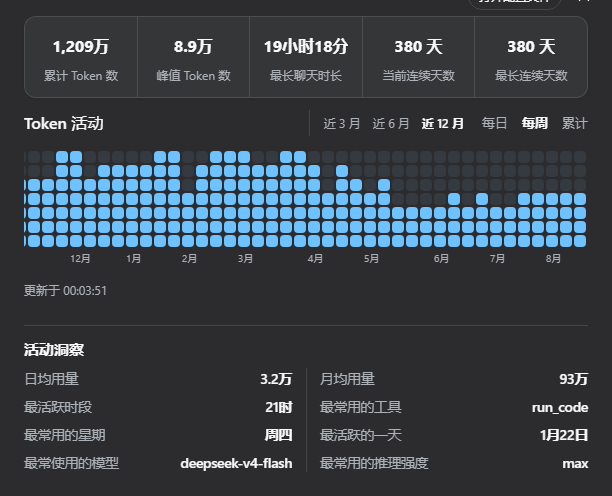
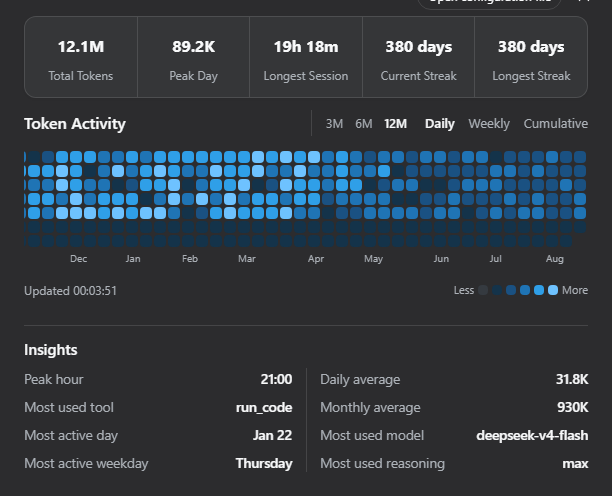
Token usage heatmap for the DeepSeek Harness (dsh) web GUI — a GitHub-style contribution graph for daily / weekly / cumulative token consumption, with a summary bubble, hover details, and activity insights. Mounted through the official dsh plugin mechanism (dsh plugin add) — no dsh source changes.
A "Token Activity" entry appears in the settings sidebar.
Screenshots
Daily heatmap — dark theme, English (12-month window)
Three views — dark theme, English
| Daily | Weekly | Cumulative |
|---|---|---|
|  |  |
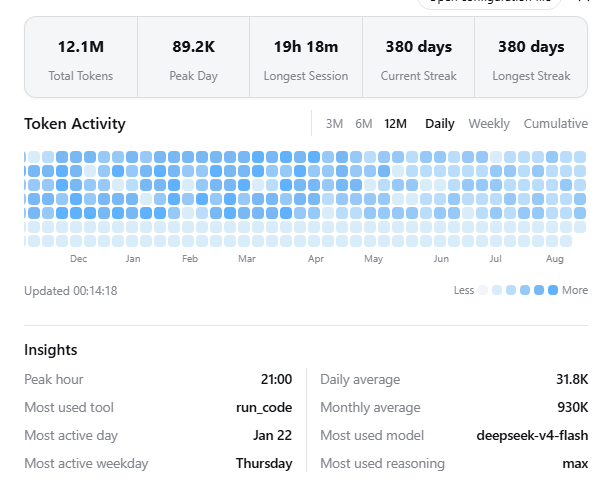
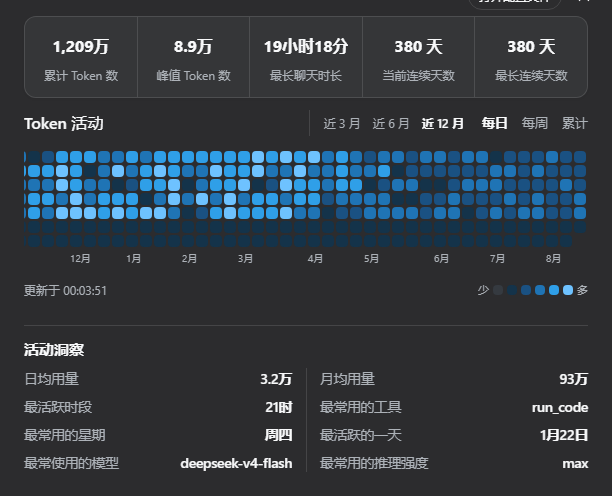
Light theme & Chinese UI
| Light (English) | 深色主题(简体中文) |
|---|---|
 |  |
Features
- Summary bubble — one rounded container with 5 statistics divided by
vertical rules: total / peak-day / longest session / current streak / longest streak;
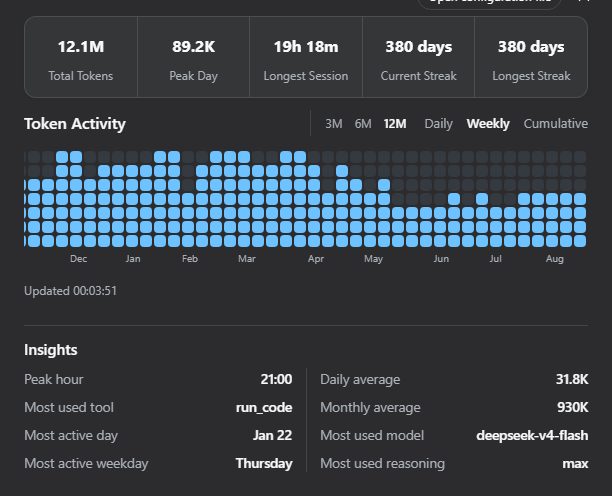
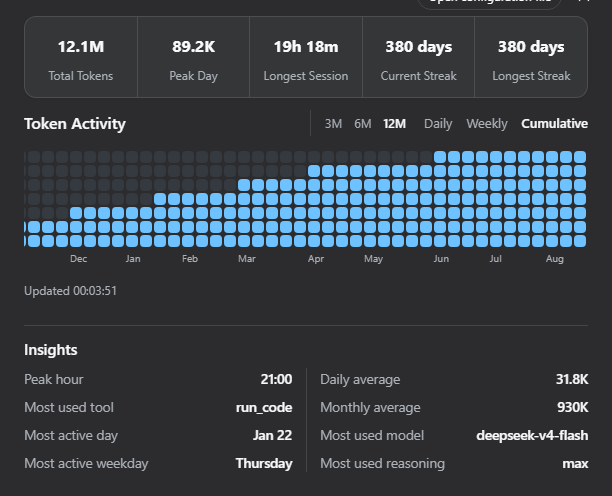
- Three views — Daily (per-day color levels), Weekly (per-week stacked
cells: week total ÷ (max week / 7) cells, deepest color), Cumulative (per-week cumulative stack: total ÷ 7 per cell, newest column always full);
- Window switch — last 3 / 6 / 12 months (default 12); fixed 12px cells,
12-month view scrolls horizontally and auto-scrolls to the latest week;
- Hover details — hovering a cell shows that day's total, that week's
total, or the week-to-date cumulative as of that day (localized zh/en);
- Activity insights — most used model / reasoning effort / tool, peak
hour, daily & monthly averages, most active weekday, most active day; sorted by label length, two equal columns with a continuous center divider;
- i18n — zh / en, follows the document language live;
- Themes — light & dark palettes, follows the dsh application theme;
- Auto refresh — re-scans changed session files every 60s and on focus;
- Cross-platform — pure Node stdlib on the host side (
fs/path/os/zlib), works on Windows, macOS and Linux; the browser half is platform-agnostic.
Install (official mechanism)
Requires pnpm on PATH:
npm install -g pnpmFrom npm (recommended):
dsh plugin --profile web add @kelearns/dsh-token-usageListed in awesome-dsh-plugin curated registry;
also searchable as token-usage in the Plugin Market tab of dsh settings (dsh-market).Local development install (run from this repository's root — link:. resolves to the current directory):
dsh plugin --profile web add link:.Remove:
dsh plugin --profile web remove @kelearns/dsh-token-usageThe installer readscordis.patch.yml(thedsh.bundle.patchmanifest
field) and applies the plugin row automatically — no manual patch editing.
Restart dsh web to activate.
Manual equivalent (no CLI)
- Put the package into the profile node_modules:
$DSH_HOME/profiles/web/node_modules/@kelearns/dsh-token-usage;
- Append this block to
$DSH_HOME/cordis.patch.yml(idempotent):
- insert:
    - id: dsh-token-usage
name: '@kelearns/dsh-token-usage'- Restart dsh web.
Data source
$DSH_HOME/sessions///session.jsonl.zstd (the official dsh JSONL persistence: concatenated zstd frames; first line is the session header, followed by the event stream).
Token usage is folded from assistant/chunk events with chunk.type === "usage" (usage { inputTokens, outputTokens, cacheReadTokens }) attributed to local days by event time (epoch ms). Total = input + output + cache read. Insights additionally read request/header (model / reasoning effort), tool/call (tools) and usage timestamps (peak hour / weekday).
Per-file results are cached by (size, mtimeMs); rescans only re-decode changed (active) sessions.
Routes (same-origin)
| Method | Path | Description |
|---|---|---|
| GET | /dsh-token-usage/stats | Full statistics: { totals, stats, insights, today, days:[{d,i,o,c,a}], scan } |
| POST | /dsh-token-usage/refresh | Force cache invalidation and rescan |
| GET | /dsh-token-usage/status | Cache / last scan state |
Configuration
- insert:
    - id: dsh-token-usage
      name: '@kelearns/dsh-token-usage'
      config:
        refreshIntervalMinutes: 5   # background rescan interval (default 5)
Tests
node test/mock.test.mjs                                   # synthetic full pipeline
node test/mock.test.mjs "$env:USERPROFILE\.dsh"  # real-data smoke (any DSH_HOME)
node test/layout-algo.mjs                                  # layout algorithm matrix
Known limitations
- Counts sessions that carry usage events (dsh session log format, verified on 0.1.0-rc.6);
- Days are attributed in the process local timezone; weeks start on Monday;
- zstd decompression requires Node >= 22.2 (satisfied by the official dsh runtime);
- Missing/unreadable session directories yield empty statistics without affecting the GUI.
License
MIT
