
dsh-usage-monitor
English | 中文
Usage dashboard for DeepSeek Harness. It folds provider-reported token usage out of session logs and charts it in Settings.
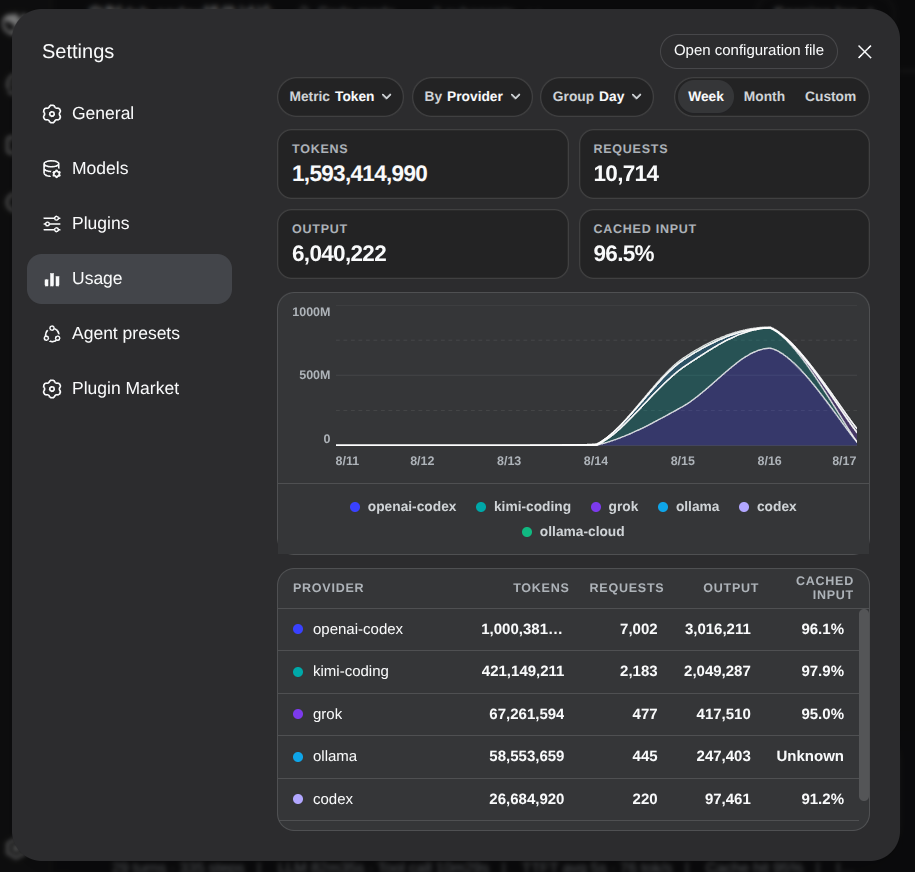
What it shows
- Tokens, requests, output tokens, and cache-hit rate
- Stacked chart with Metric (token / request), By (provider / model / workspace), Group (day / week)
- Week, month, and custom ranges
- A responsive overview with a full-width token summary, compact secondary metrics, a stacked chart, and token-share cards that follow the current By grouping
- On narrow screens, the cards collapse to one column and the chart legend scrolls horizontally
Subscription quotas are not fetched.
Installation
DeepSeek Harness 0.1.0-rc.6 or later is required. Install directly from GitHub:
dsh plugin --profile web add github:NOirBRight/dsh-usage-monitor#v0.2.9
dsh web
The repository tracks release-ready lib artifacts, so GitHub installation needs no build-script allowlist. A source checkout can use a link installation after running pnpm run build.
Then open Settings → Usage.
Data
Reads ctx.sessionQuery (live + persisted sessions). Does not scan session.jsonl.zstd itself and does not read leftover community cache files.
Release
pnpm run check runs the full gate in order: unit tests, TypeScript typecheck, deterministic build-parity (clean temp build vs tracked lib/), package build, and a real npm pack + immutable fixture validation + offline install + Host/client import smoke. The pack check reads only the repository-owned alpha.1 manifest/tarballs, verifies official tag/commit and registry integrity, preserves versioned parent edges including duplicate versions, and uses a fresh pnpm consumer with an invalid registry, offline/no-scripts/no-audit/no-fund settings, empty NODE_PATH, and scoped local-tarball overrides; it uses neither --legacy-peer-deps nor omit/force bypasses. The owner archive is written only below the prefixed temporary directory; repository .tgz files are limited to the 86 alpha.1 fixtures. It does not rewrite lib/ before comparison, so a stale, missing or hand-edited artifact fails.
For a tag, run pnpm run check:strict (the same test, typecheck, parity, build, and pack order with PARITY_CHECK_HEAD=1; it fails if the committed lib/ still differs from the source — the v0.2.5 drift guard). Keep src as the source of truth and commit the rebuilt lib/.
The Settings → Usage nav icon is a DOM patch via ctx.effect + MutationObserver on document.body; see src/client/nav-icon.ts for the ctx.effect disposer and the accepted alpha.1 DOM risk.
Release installation (Latest)
Session-log usage dashboard with responsive metric cards, charting, and provider shares. The release artifact targets DeepSeek Harness 0.1.2-alpha.1 and contains built Host/Client files only; it has no sibling-repository source, workstation path, link:, or workspace: dependency.
Latest installation (the URL never contains a version):
dsh plugin --profile web add --force \
  https://github.com/NOirBRight/dsh-usage-monitor/releases/latest/download/dsh-usage-monitor.tgz
Fixed-version installation:
dsh plugin --profile web add --force \
  https://github.com/NOirBRight/dsh-usage-monitor/releases/download/v0.2.9/dsh-usage-monitor.tgz
Update, uninstall, and verify:
# Update to the latest Release
dsh plugin --profile web add --force \
  https://github.com/NOirBRight/dsh-usage-monitor/releases/latest/download/dsh-usage-monitor.tgz
# Verify the loaded version
dsh plugin --profile web list
dsh plugin --profile web doctor
# Uninstall only this plugin
dsh plugin --profile web remove dsh-usage-monitor
Configuration: use the plugin section in Settings for Web UI plugins, or the profile dsh.profile.bundles entry for Host-only plugins. Start with this README's minimal YAML/JSON example and provide credentials/backend addresses explicitly.
Rollback: rerun the fixed v0.2.9 command, verify the profile list, then restart the Web service once. Inspect journalctl --user -u dsh-web.service and dsh plugin --profile web doctor; never put a source checkout in the production profile.
Release and integrity: v0.2.9 · SHA256SUMS.
