
dsh-web-service-manager
在 DeepSeek Harness 内部管理 dsh web 服务 —— 日常操作无需再开终端。Manage the dsh web service from inside DeepSeek Harness — no terminal needed for day-to-day operations.



中文
功能
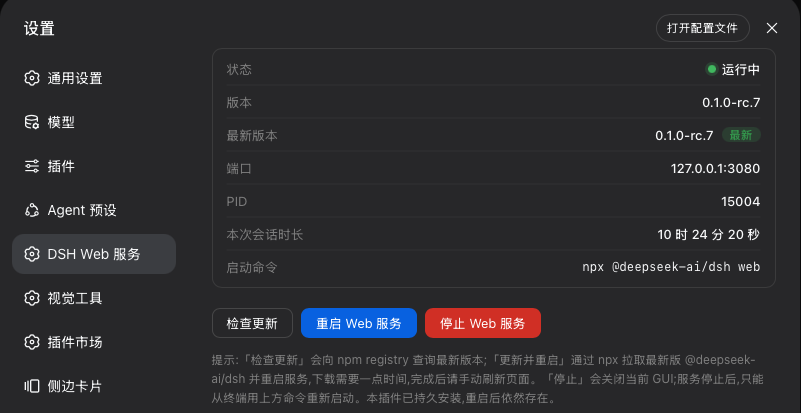
- 状态面板(设置 → DSH Web 服务):运行状态、版本、端口、PID、会话运行时长。
- 重启:先把替换实例放进独立进程会话,再退役当前进程 —— 新服务不受旧进程优雅清理(SIGTERM → 根 fiber dispose)的影响。
- 停止:终止当前服务(面板所在的 GUI 会随之关闭)。
- 版本检查:与 npm registry 对比当前运行版本。
- 一键更新:发现新版本后,通过
npx拉取最新@deepseek-ai/dsh并自动重启。
安装
# 从 GitHub 直接安装:
dsh plugin --profile web add github:wiyi/dsh-web-service-manager

# 发布 npm 后也可以:
dsh plugin --profile web add dsh-web-service-manager
重启一次 web 服务,然后打开 设置 → DSH Web 服务。
工作原理
宿主半提供 GET /dsh-web-manager/status、GET /dsh-web-manager/check、POST /dsh-web-manager/restart、POST /dsh-web-manager/update、POST /dsh-web-manager/stop;写操作要求同源请求。
重启与更新使用小型看门狗链:替换实例以独立进程会话(detached: true)启动,先于旧进程退役。因为 SIGTERM 会让 harness 销毁整个组合 —— 包括所有托管子进程;只有脱离进程组的替换实例能在这场清理中存活下来。
注意事项
- 停止会关掉你正在使用的 GUI;重新启动需在终端运行
npx @deepseek-ai/dsh web。 - 重启/更新后,等新实例接管端口,再手动刷新页面。
- 安装插件意味着以你的权限运行第三方代码。本插件会停止、启动和更新 web 服务进程,在重要环境安装前请阅读源码。
English
Features
- Status panel (Settings → DSH Web 服务): running state, version, port, PID, session uptime.
- Restart: detaches a replacement instance into its own process session before retiring the current one, so the new server survives the old process's graceful teardown.
- Stop: terminates the current service (this also closes the GUI the panel lives in).
- Version check: compares the running version with the npm registry.
- Update & restart: pulls the latest
@deepseek-ai/dshthroughnpxand restarts on it.
Install
# Directly from this repo:
dsh plugin --profile web add github:wiyi/dsh-web-service-manager

# Or, once published to npm:
dsh plugin --profile web add dsh-web-service-manager
Restart the web service once, then open Settings → DSH Web 服务.
How it works
The host half serves GET /dsh-web-manager/status, GET /dsh-web-manager/check, POST /dsh-web-manager/restart, POST /dsh-web-manager/update, and POST /dsh-web-manager/stop. Mutating routes require a same-origin request.
Restart and update use a small watchdog chain: the replacement instance is spawned in its own process session (detached: true) *before* the current process is retired — on SIGTERM the harness disposes its whole composition, including every managed child process, and a detached replacement is the only child that survives that cleanup.
Notes
- Stop ends the GUI you are using; start it again from a terminal with
npx @deepseek-ai/dsh web. - After restart or update, refresh the page once the new instance has taken over the port.
- Installing a plugin runs third-party code with your own permissions. This plugin stops, starts and updates the web service process; read the source before installing it anywhere important.
License
MIT
